Why You Need to Be Cautious of Fake Login Pages?
Fake login pages are a common starting point for many account security issues. They can closely resemble legitimate platform pages, using similar colors, layouts, buttons, and prompt text, often accompanied by alarming messages such as "Account Exception," "Verification Required," "Message Undeliverable," or "Security Check." The real danger lies in entering your password, verification code, or account information on the wrong page, as this data may be sent to unauthorized individuals. For ordinary users, fake login pages can easily cause a lapse in vigilance. They may not look immediately suspicious and may not show obvious errors right away. Some pages even use HTTPS, similar domains, familiar login screens, and seemingly official prompt text, leading users to mistakenly believe they are on the official site. Therefore, taking a few extra seconds before entering your password to check the page source, URL, and prompt content is an essential habit for account protection.
Pause for a Few Seconds Before Logging In
Many suspicious login pages exploit a sense of urgency to prompt quick action. They might inform you that your account is about to be disabled, requires immediate verification, or that important information will be lost, urging you to log in to view it. Before entering your password, pause for a few seconds and ask yourself a few questions:
- Did I come from the official App or official website?
- Did this link come from an unknown message, Email, comment, or advertisement?
- Was I planning to log into this platform?
- Is this page pressuring me to act immediately?
Legitimate platforms typically do not require you to log in via a link from an unknown message. If a login request appears unexpectedly, it’s worth conducting a thorough check.
Carefully Check the URL Bar
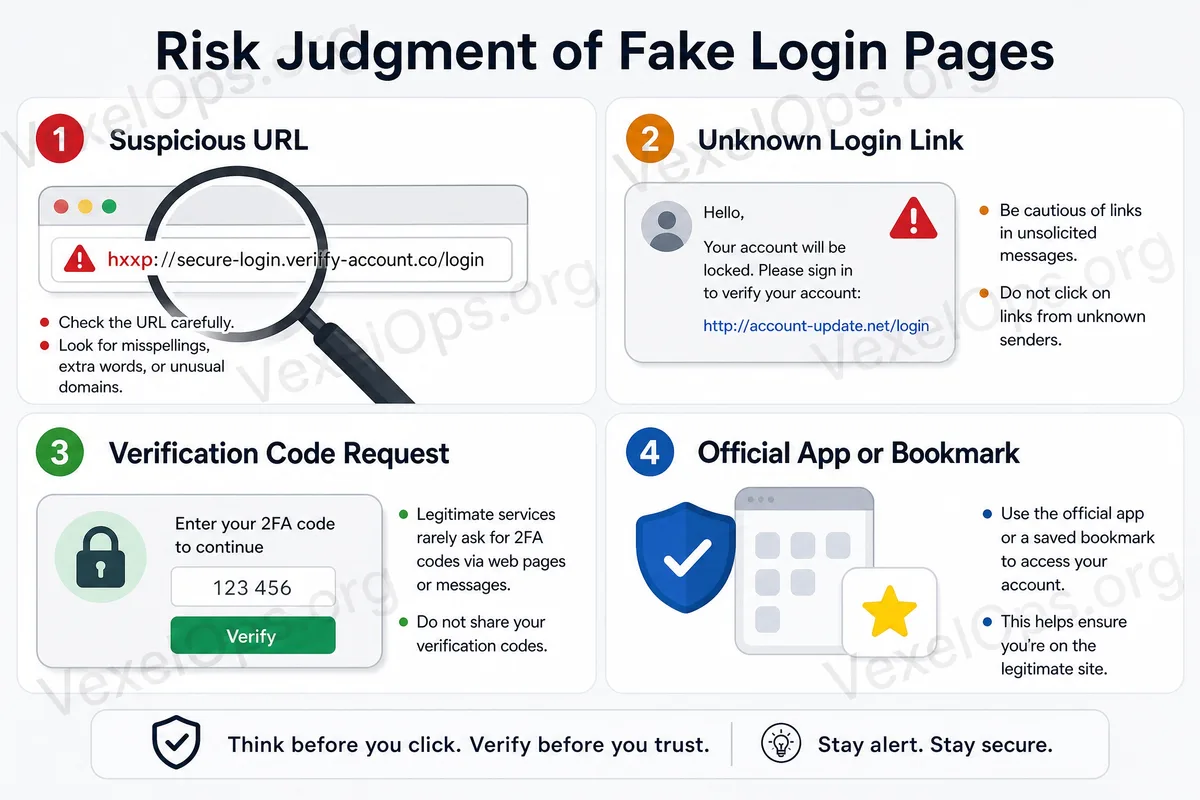
The URL bar is a crucial location for assessing the trustworthiness of a login page. Some suspicious pages use URLs that closely resemble the official website, such as adding extra words before and after the brand name, using similar spellings, substituting certain letters, or employing lengthy URLs that obscure the actual domain. URL features to watch out for include: 1. The URL is very long and the actual domain is unclear. 2. The brand name has strange extra words attached. 3. The spelling is very close to the official name, but not exactly the same. 4. It uses an unfamiliar domain suffix. 5. It redirects through short URLs, making the final destination invisible. Additionally, the padlock symbol on the browser does not guarantee a site's safety. The padlock usually indicates that the connection is encrypted, which does not assure that the page itself is the official site. Suspicious websites can also use HTTPS.
Don’t Trust Links in Messages Easily
Many fake login pages start from messages. You might see a link in Emails, text messages, social media direct messages, chat apps, or comments that looks like a platform notification, package alert, account reminder, or customer service message. Before clicking, you can check: 1. Who sent this message? 2. Is the sender truly an official account? 3. Does the wording have strange tones or typos? 4. Is it asking you to log in via the link? 5. Is it asking you to enter your password, verification code, or recovery information? A safer approach is: don’t log in directly from a link in a message. You can open the official App yourself or manually enter the official URL in your browser to check for relevant notifications.
Observe Details on the Login Page
Fake login pages may imitate real websites, but the details might be lacking. Common suspicious signs include: - Logo or images that are blurry. - Unnatural page layout. - Buttons or links that are unresponsive. - Sentences that are awkwardly phrased or poorly translated. - Login boxes appearing in unreasonable positions. - Absence of official explanations, privacy policies, or support links. A single detail may not necessarily prove that the page is problematic, but if multiple aspects seem off, it's best to halt any actions.
Do Not Enter Verification Codes on Suspicious Pages
Some pages not only ask for your password but also for verification codes received via mobile or Email. Verification codes are typically used to confirm logins, modify account settings, or pass security checks. If you enter a verification code from a suspicious link, it could allow malicious parties to complete important actions. When a page requests a verification code, be especially cautious: - Are you working within the official App or website? - Is this verification code something you requested? - Is the page from an unknown link? - Is anyone pressuring you to provide the verification code immediately? If the source is not clear, simply do not enter the verification code.
Use Bookmarks or Official Apps for Important Accounts
For frequently used accounts, develop the habit of using bookmarks or official Apps. For instance, social media platforms, Email, cloud storage, payment tools, or work accounts can all be opened directly from the official App, or you can add the official website to your browser's bookmarks. This reduces the chances of mistakenly accessing fake pages via unknown links. This habit is simple but significantly aids daily account security.
Regularly Check Your Account Security Settings
Even if you're usually cautious, it’s advisable to regularly check your account security status. Items to check regularly include: - Whether two-step verification is enabled. - Whether backup Email and phone numbers are correct. - If the recent login history appears normal. - If there are any unknown devices logged in. - Whether there are any unrecognized third-party App connections. - If there are any pending security alerts. If you see unfamiliar devices, regions, or connection items, you should promptly check and remove any unauthorized access.
When in Doubt, Do Not Enter Any Information
If a login page seems odd to you, don’t adopt a "let me try entering it first" mentality. Once your password and verification code are sent out, it might already be too late. A safer practice is to save the link, take a screenshot, and then double-check with the official App or website. If necessary, you can seek help from someone familiar with digital security to assess the situation.
Conclusion: Take One Extra Step Before Logging In for Basic Account Protection
Fake login pages are effective because they look familiar and create pressure, leaving little time for careful confirmation. Truly effective protection does not solely involve installing tools but rather establishing a habit of "checking before logging in." Checking URLs, avoiding unknown links, using official Apps, and cautiously entering verification codes—these small actions can greatly reduce the risk of account problems. For further digital security evaluation and personal guidance, you can contact VexelOps via Telegram, or visit VexelOps.org for more information.