
When was the last time you logged into the router management interface?
Most people manage their home routers at a level that only considers restarting the device when the lights are off. The internet service provider sets it up, confirms connectivity, and then leaves; the router remains untouched in the corner from that day forward. This situation is quite common in home networks worldwide, and precisely because of this, home routers become effective targets for attackers seeking points of intrusion. A router that isn't actively managed may have issues such as unchanged default passwords, firmware that hasn't been updated in years, and unnecessary remote management features left open, all of which can typically be exploited using information from public vulnerability databases. In 2018, a malware called VPNFilter infected over 500,000 routers globally, targeting mainly home devices with unupdated firmware. Attackers could intercept internet traffic, inject malicious content, or turn these devices into platforms for attacking other targets. This isn't a hypothetical risk; it has already been a large-scale incident.
Common Security Issues with Home Wi-Fi
Default Admin Password Never Changed Routers typically have a default admin username and password, such as admin/admin or admin/password, which are public knowledge in technical documents across brands. If these have never been changed, anyone connected to your home Wi-Fi, or anyone who can access the router management interface, can log in using the default credentials and change all settings. Firmware Not Updated for Long Periods Router firmware updates usually contain fixes for security vulnerabilities, but most home routers do not update automatically and require manual action from the user. Outdated firmware may contain publicly known vulnerabilities that attackers can exploit without knowing the admin password to take control of the router. WPS Feature Enabled WPS is a feature that allows devices to quickly connect to Wi-Fi by either pressing a physical button on the router or entering an eight-digit PIN. This eight-digit PIN has a known weakness that significantly reduces the number of attempts needed for brute force attacks. Researchers disclosed this vulnerability in 2011, but many routers still have WPS enabled by default today. ##Remote Management
Settings to Check Right Now
The following steps require no technical background, and most home routers can be accessed by entering 192.168.1.1 or 192.168.0.1 in a browser:
- Change the admin password to a strong password different from the Wi-Fi password
- Check the firmware version on the system information page in the management interface and compare it with the latest version on the manufacturer's website
- Disable the WPS feature, usually found on the wireless settings or advanced settings page
- Verify that the remote management feature is turned off, usually located in the management or security settings page
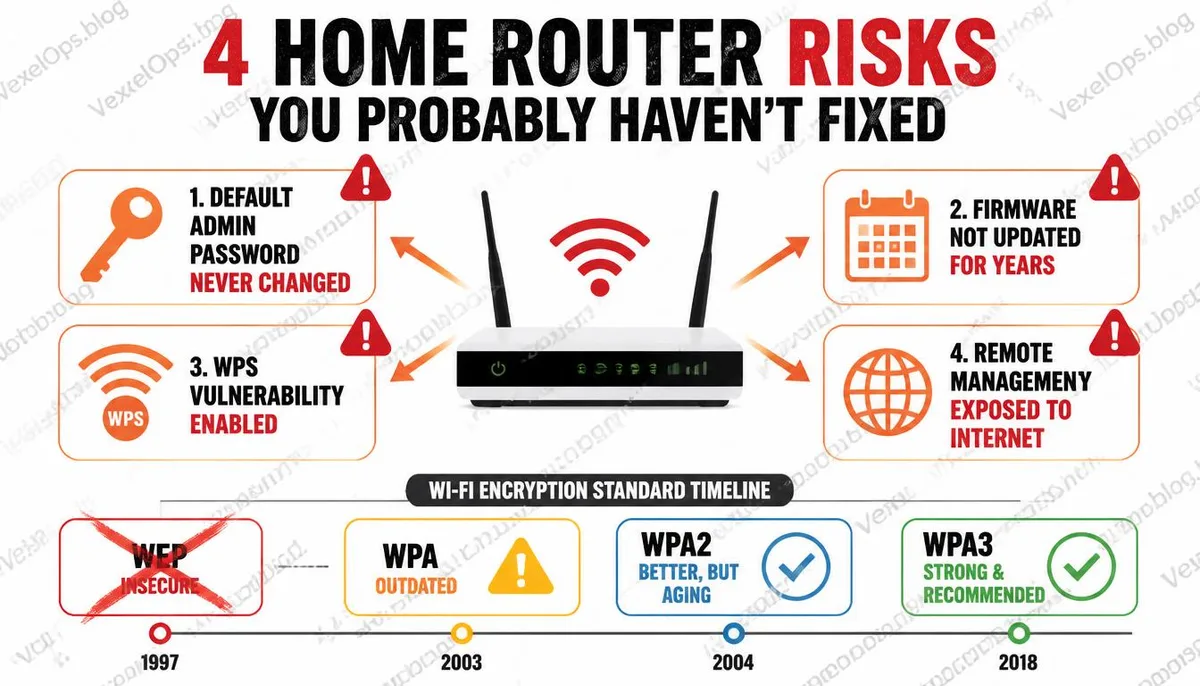
Evolution of Wi-Fi Encryption Standards
Wi-Fi encryption protocols have undergone several major updates over the past few decades, each time due to the discovery of exploitable vulnerabilities in the previous version. The current mainstream encryption standard is WPA3, released in 2018, which provides stronger protection than its predecessor, WPA2. WPA2 was found to have a vulnerability called KRACK in 2017, allowing attackers to decrypt WPA2-protected network traffic under specific conditions; this vulnerability has been patched with firmware updates, but only devices that have updated their firmware are protected. If your router settings still show the use of WEP or WPA, two older encryption protocols, you need to switch to WPA2 or WPA3 as soon as possible. WEP has been proven to be crackable in minutes since 2001, and continuing its use amounts to no encryption.
Frequently Asked Questions About Home Wi-Fi Security
Can neighbors steal my Wi-Fi? Is it just a cost issue?
It's not just a cost issue. If unknown devices connect to your home network, those devices are on the same network as all of your household devices, including your phones, computers, NAS devices, and smart appliances. On home routers without appropriate isolation settings, devices on the same network can communicate directly with each other; this means that unknown devices connecting to your Wi-Fi technically have the possibility to attempt accessing your other devices. In more severe cases, if someone engages in illegal activities through your network, the related traffic may appear to originate from your IP address externally.
Which is more dangerous, public Wi-Fi or home Wi-Fi?
The risk nature of both is different and not directly comparable. The primary risk of public Wi-Fi arises from unknown users on the same network; anyone can join, and the barrier for man-in-the-middle attacks is relatively low. The primary risk of home Wi-Fi arises from the security state of the device itself; if the router has unpatched vulnerabilities or unchanged default passwords, the chance of attackers breaching from an external network is a real possibility. Using a VPN on public Wi-Fi can effectively reduce the risk of traffic interception but doesn't provide direct help for security issues with home network devices; both scenarios require different approaches. Further Reading: What is Shodan? Why is it called the hacker's search engine?
How do I know if my router has been compromised?
This is the trickiest aspect of home router security; in most cases, you won't have obvious indications. Slower internet speeds and unstable connections can be signs, but there could be many other reasons. A more proactive way to verify is to regularly log into the router's management interface and check the list of devices currently connected to the network, ensuring all devices are recognized. If you discover unfamiliar devices, changing the Wi-Fi password is the most direct way to disconnect any connected unknown devices while also needing to verify the router's admin password and firmware version.
One Key Takeaway: A home router is the gateway to your home network, but most people manage it far less than they do their phones or computers. Changing the default password and keeping the firmware updated are two basic protective actions that can be done without a technical background.