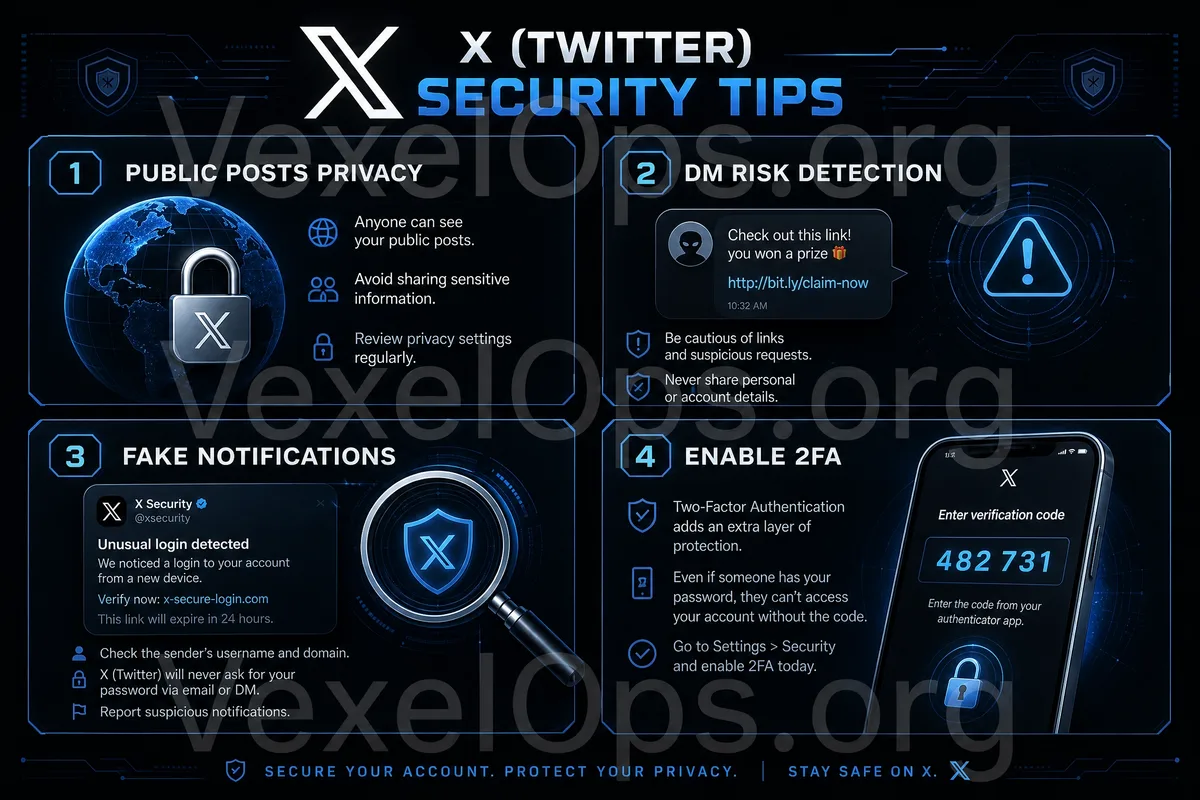
X is a Highly Public Platform

X is characterized by rapid information flow, extensive public interaction, and quick sharing. Many ordinary users follow news, engage with creators, participate in topic discussions, check brand announcements, or interact with strangers on X. Due to its high level of openness, users need to pay attention to several things: the content you post may be seen by strangers, your interactions might be screenshot or forwarded, private messages you receive may not be trustworthy, and seemingly official notifications may also be fake. X is fundamentally a social tool; the real risks often arise from user habits, such as oversharing personal information, clicking on unknown links, trusting fake customer service, neglecting to check login activities, or failing to secure their primary email.

Risk Card 1: Public Posts May Expose Personal Clues

It is very easy to post on X, but public content can be easily searched, screenshot, forwarded, and saved long-term. Even if you delete a post later, it does not mean that someone has not already saved it. Common types of public information that are often overlooked include: 1. Current location 2. Work or school information 3. Frequently visited places 4. Family or friend relationships 5. Emotional state and lifestyle habits 6. Contact information or accounts on other platforms 7. Addresses, license plates, or documents visible in background photos Safety Reminder: Before posting publicly, consider: will this content make it easier for strangers to ascertain my identity, location, or lifestyle patterns?

Risk Card 2: Unknown Private Messages May Not Be Trustworthy

You may receive unknown private messages on X, some may look like collaboration invitations, customer service notifications, investment opportunities, account verifications, or event messages. Particular types of messages to be cautious of include: 1. Requests to click a link to log into your account 2. Requests for verification codes or backup codes 3. Claims that your account will be suspended 4. Invitations to join investment, airdrop, or quick profit opportunities 5. Requests to download files or install tools 6. Impersonating a brand, customer service, or platform security team Legitimate services typically won’t request your password, verification codes, or payment information through unknown private messages. If anyone asks you to take immediate action, you should pause and verify.

Risk Card 3: Fake Notifications and Phishing Links

Many phishing risks disguise themselves as platform notifications, such as "Your account has violated rules," "Please complete verification," "There has been unusual login to your account," or "Immediate identity confirmation needed." These types of links may lead to fake login pages. The pages might look like the official website, but the purpose could be to gain your account, password, and verification codes. The judgment criteria are simple:

  • Do not log into your account via links from unknown private messages
  • Do not trust notifications that require immediate action
  • Do not provide verification codes to anyone
  • Do not download unfamiliar files
  • When verification is needed, directly open the official App or website
X account security checklist, including public posts, unknown private messages, fake notifications, login activities, and two-factor authentication.

X Account Security Checklist

You can regularly check the following items: 1. Is your password unique? Do not share your X account password with your email, Facebook, Instagram, shopping websites, or other platforms. If a certain platform suffers a data breach, sharing passwords may compromise other accounts. 2. Is two-factor authentication enabled? Two-factor authentication adds a second layer of protection beyond the password. Even if the password is compromised, the other party may not be able to log into your account directly. 3. Is the login activity normal? Check for unfamiliar devices, unusual locations, or unknown times in the login records. If suspicious activity is found, immediately change your password and log out of unknown devices. 4. Are your email and phone still accessible? Account recovery information is very important. If the registered email or phone number is no longer in use, it may be more difficult to recover the account in the future when issues arise. 5. Is there excessive third-party authorization? If you have authorized third-party tools, event pages, analytical tools, or login services, you should regularly check and remove unfamiliar items.

Simple Safety Rules for Using X

You can simplify daily usage rules into a few statements: Before posting publicly, think about whether it may expose personal clues. When receiving a private message, first assess if the other party is asking you to click a link, provide information, or make a payment. When seeing unusual account notifications, do not log in through unknown links; confirm directly with the official portal. These rules may seem simple, but they can prevent many common risks. Most account security issues are often not due to users lacking technical understanding, but rather because, in moments of stress, curiosity, or trust, they clicked a link too quickly.

What Should You Do If You Discover Unusual Account Behavior?

If you suspect there is a risk with your X account, you can handle it in this order: 1. Immediately change your password 2. Log out of unfamiliar devices 3. Check the two-factor authentication settings 4. Confirm that the email and phone number have not been changed 5. Remove any unfamiliar third-party authorizations 6. Check for unknown posts, forwards, private messages, or following behaviors 7. Inform friends not to click on suspicious messages from your account If you can no longer log in, you should go through the official account recovery process and not trust strangers claiming they can "quickly recover the account."

Platform Security Comes from Daily Habits

X is a platform with very rapid information flow, so it is more necessary to maintain basic vigilance while using it. Control the public content, assess unknown private messages, check login activities, and enable two-factor authentication for important accounts. Ordinary users do not need to complicate platform security. Just do a few things: do not overshare personal information, do not log in through unknown links, do not provide verification codes, do not download unknown files, and regularly check account settings to reduce many common risks. The security of social platforms is not just the platform's responsibility, but also relates to every user's sharing habits, login habits, and risk judgment.