
A Facebook Page is More Than Just Posting; It's an Important Asset
Many small brands, personal studios, online shops, creators, or service-based businesses treat their Facebook page and Instagram business account as their main exposure channel. While they seem like everyday operational tools for posting, replying to messages, advertising, and receiving customer inquiries, they actually represent a significant digital asset. A Facebook page accumulates followers, posts, private messages, ad data, pixel events, payment records, and brand trust. If management rights are obtained by strangers, the impact can extend beyond just being unable to post. They may change the page's name, remove existing admins, misuse ads, bind to unfamiliar payment methods, alter contact information, or exploit the brand's identity to message customers. Some pages are taken over not because of sudden platform failures, but due to neglected management rights. Employees, agencies, advertisers, designers, or freelancers that once collaborated may still retain access. If an admin's personal Facebook account is hacked, it may also compromise the entire page.
First, Clarify: Who Has Top Access Rights?
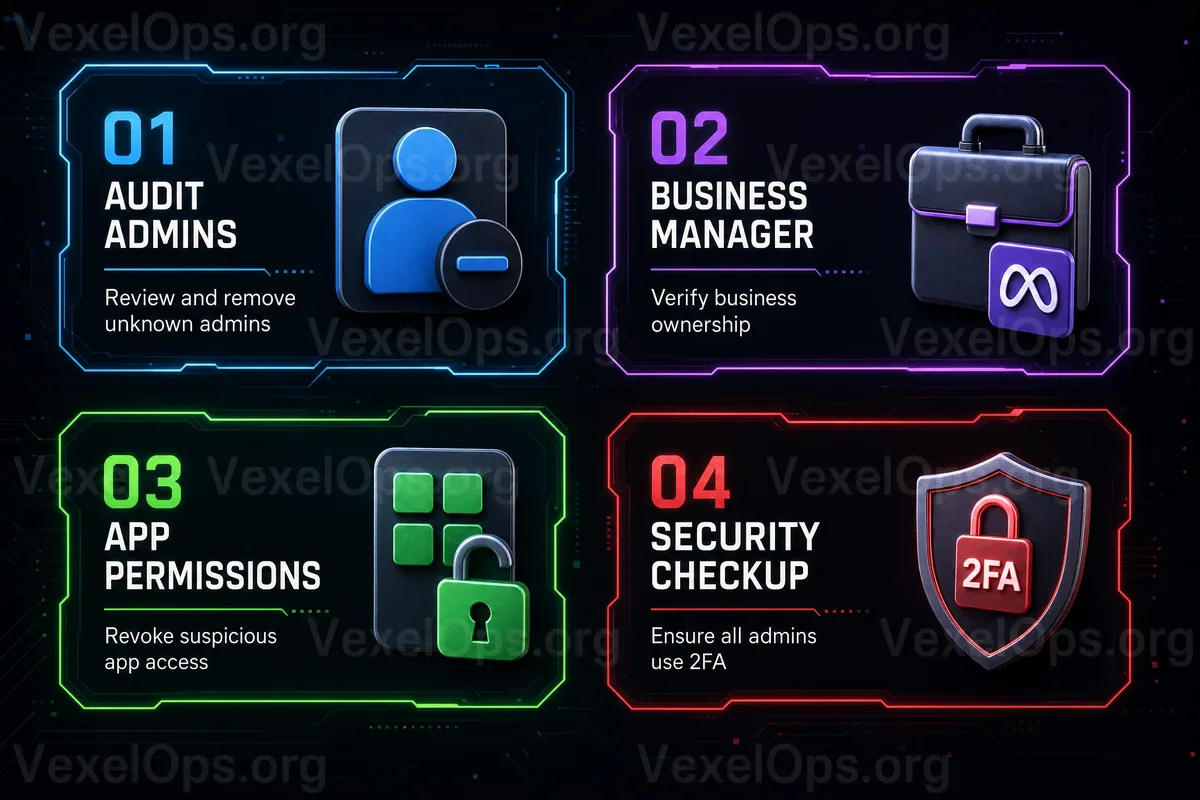
When checking the safety of a Facebook page, the first thing is not to change the logo or update posts, but to confirm 'who has access rights.' Many administrators are not even aware of how many admins currently have access or who can add or remove others. In Meta Business Suite, Business Manager, or page settings, there are typically different levels of roles, such as full control, partial control, content management, message management, ad management, and data insights viewing. Different permissions allow for different actions, and therefore, different risks. Here are key points to be aware of: 1. Are there any admins you do not recognize? 2. Are there former employees who still have access? 3. Do outsourced or agency partners still have full control? 4. Are there unknown partners added to Business Manager? 5. Do any individuals manage payment methods or ad accounts? 6. Are there unknown apps or tools linked to your business account? If you see unfamiliar individuals with high access, do not rush to delete them. First, verify their source, when they joined, and whether they relate to past collaborations. After verifying, you can remove unnecessary permissions to avoid
Instagram Business Accounts Also Need Checking
Many only check Facebook pages but forget that Instagram business accounts are usually connected to Meta Account Center, pages, ad accounts, or business assets. This means that Instagram is not just a standalone app; it may be tied to the entire Meta business infrastructure. If an Instagram business account is logged into by strangers, the following may occur: - Profile links changed to unfamiliar ones - Suspicious ads appearing on stories or posts - Customers being directed to Telegram, WhatsApp, or fake customer service pages via private messages - Account being used to post fraudulent investment content - Original Facebook page or ad accounts being adversely affected Especially for business accounts running Meta Ads, it’s crucial to verify ad accounts, payment methods, partners, pixels, and page permissions. Many ad misuse incidents that seem like 'ad accounts being hacked' may actually stem from an account belonging to someone with access being compromised.
Ad Accounts and Payment Methods Are High-Risk Areas
Having your Facebook page taken over is already troublesome, but if ad accounts and payment methods are also involved, losses can occur even more swiftly. If attackers gain access to ad accounts, they can quickly establish numerous ad campaigns, deplete budgets, or even promote content unrelated to your brand. Therefore, when managing a Facebook page or Instagram business account, regularly check ad accounts for: - Unfamiliar ad campaigns - Unrecognized payment methods - New partners being added - Unknown individuals with ad management rights - Sudden budget increases - Ads running in strange locations or languages If you typically run few ads but receive notifications for ad payments, payment failures, or ad review alerts, you should immediately investigate. Don’t dismiss these notifications as spam, as they could be the first sign of irregularities in your account.
Easily Overlooked: Former Collaborators
Many account security issues do not arise from unknown hackers but from previous access permissions that were not cleaned up. Freelancers who previously managed your ads, former employees who managed the page, short-term marketing companies, or technicians who helped set up pixels may still have access after collaborations end. This does not necessarily indicate malicious intent, but if their own accounts are hacked, your page may be impacted. The more admins you have, the more access points for risks. A healthier practice is to establish a simple rule: give the minimum necessary permissions to those who need access; after collaborations conclude, remove access rights that are no longer needed. Don’t allow everyone full control for convenience. If the team has multiple managers, it is advisable to retain at least two trusted core admins to avoid having only one person with top access; however, don’t give top access to too many individuals. It’s a balancing act: too few, and there’s a risk of losing access; too many, and the risk increases.
Protect the Admin's Facebook Account Too
Page safety is not just within the page settings; it extends to every admin's personal accounts. If a particular admin’s Facebook account is hacked, the attacker may leverage their permissions to access the page or Business Suite. Thus, every admin should ensure basic protections: 1. Enable two-factor authentication 2. Use unique and strong passwords 3. Do not share Facebook passwords with other sites 4. Regularly check login locations 5. Avoid clicking on fake Meta official notifications 6. Never provide verification codes to customer service or colleagues 7. Do not install unknown browser plugins or suspicious advertising tools Be particularly cautious of fake Meta notifications. Fraudsters often use reasons such as 'Your page is about to be disabled,' 'Ad violations,' 'Trademark infringement,' or 'Needs appeal,' to trick admins into clicking on fake login pages. If admins enter account details on these fake pages, the page could be adversely impacted.
If You Discover Anomalies, Don't Immediately Change Everything
If you notice anomalies on your page, Instagram business account, or ad account, your first reaction may be to delete users, change passwords, or stop ads immediately. However, if the situation is more complex, it’s advisable to save basic data first to avoid confusion about what happened later. You may want to record: - When you discovered the anomaly - Which admins or partners were added - Which permissions were changed - Whether there were unknown ad activities - Any anomalies in payment methods - If you received any security notifications from Meta, Facebook, or Instagram - Whether any fake customer service or phishing links appeared This information is useful for later appeals to the platform, internal investigations, and for confirming with payment parties or seeking assistance. If you can no longer access your page or business management platform, be sure to keep email notifications, screenshots, and relevant conversations.
Make Page Safety a Regular Maintenance Task, Not a Reactive One After Issues Occur
Managing Facebook pages and Instagram business accounts over time, the most commonly forgotten task is clearing permissions. Many are busy posting, responding to messages, reviewing data, and advertising daily, and seldom take the time to regularly open Business Suite to check personnel, partners, and payment settings. However, for brands, pages and business accounts are gateways for customers to recognize you. They are not just social media pages but part of trust, traffic, and sales. Instead of waiting for your account to be taken over, ads to be misused, or customers guided by false information before rectifying, it is better to conduct a permissions review periodically. The simplest safety habit is to: check admins and partners monthly; remove unnecessary permissions after collaborations; enable two-factor authentication for each admin; ensure ad accounts and payment methods are only managed by those who truly need access. These actions are not complicated but can significantly reduce the risk of page takeovers, business account misuse, and ad account anomalies.