
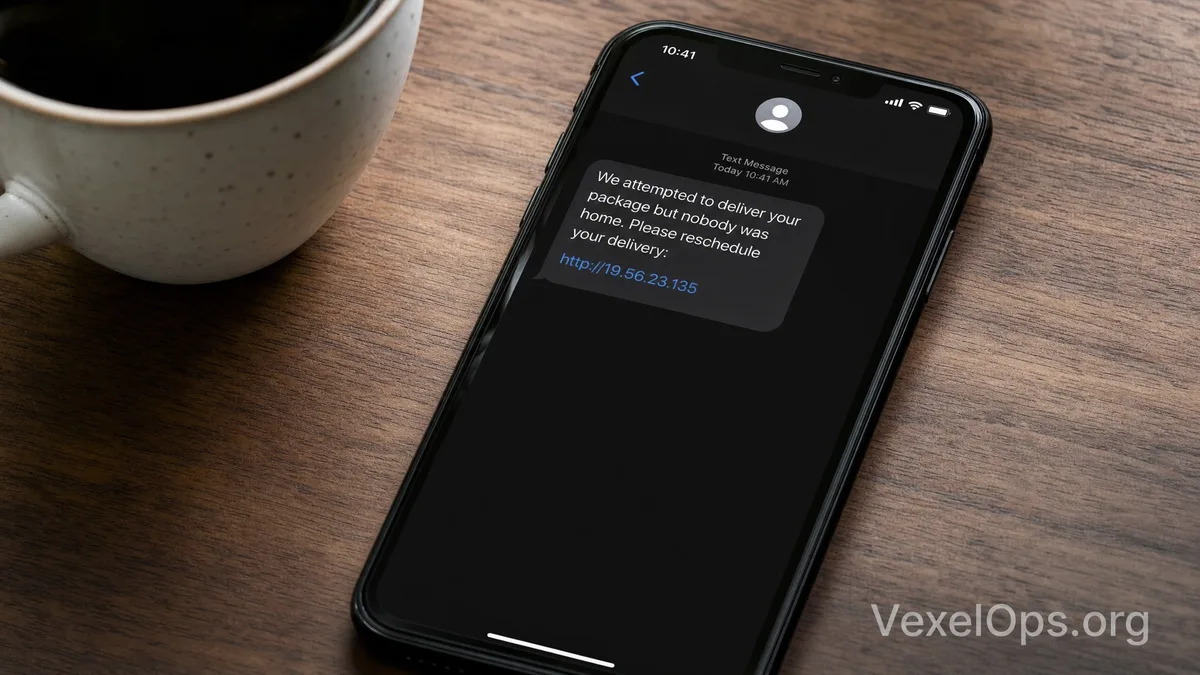
An Ordinary-Looking Package Notification May Not Be From a Courier Company

Many people shop online every day, and receiving package notifications has become quite common. Especially with Amazon, eBay, Shopee, DHL, FedEx, UPS, USPS, or other courier services, notifications about shipment status are often sent via email, SMS, WhatsApp, or apps. Because such notifications are so prevalent, fake package messages can more easily lower one's guard. Scammers usually send very brief texts like: "Your package could not be delivered," "Address is incomplete," "Need to pay a small duty," "Please update recipient information," or "Package will be returned to the warehouse." A link that appears to be for tracking logistics will often follow these messages, enticing you to click. The scariest aspect of these scams is not that the initial amounts are high, but rather that they tend to be small. For instance, they might ask you to pay $1, $2, or a small shipping fee or customs handling charge. Many people think, "The amount isn't much, I'll just pay it," but the real target could be your credit card details, email, phone number, address, or even bank or payment platform verification codes.

How Are Fake Logistics Links Typically Packaged?

Fake package notifications often deliberately mimic the tone of real logistics messages. They may not be overly exaggerated; they can appear quite normal and formal. Common content includes: 1. Package delivery failed; please rearrange delivery. 2. Recipient address is incomplete; please update immediately. 3. Package stuck in customs; duty needs to be paid. 4. Payment incomplete; please pay a small handling fee. 5. Your delivery will be returned; please confirm within 24 hours. 6. Click the link to view the latest logistics status. Upon clicking, you may see fake logistics logos, fake tracking numbers, fake delivery progress bars, recipient information forms, and payment pages. These screens are not always rough; some can appear very close to real websites. You can check a few details first: Is the URL truly from the official domain? Are there any strange spellings, extra symbols, or unfamiliar country domains? Does the page ask you to enter complete credit card information, CVV, security codes, email passwords, or SMS verification codes? If so, you should stop immediately.

Why Are Fake Customs SMS Particularly Believable?

Fake customs SMS often exploit the situation surrounding "cross-border packages." Many people shop from foreign websites and may indeed encounter duties, customs clearance, address confirmations, or delivery delays. Therefore, when messages mention "customs hold," "import duty," "customs clearance failure," or "missing documents," it can easily cause recipients to feel anxious. Scammers leverage this uncertainty to make you believe you need to act immediately, or else the package will be returned, destroyed, or incur penalties. This sense of urgency is a typical risk signal. Real logistics and customs processes usually provide more complete notification sources, such as through official apps, order platforms, official websites of logistics companies, or formal customer service channels. If uncertain, you can return to the shopping platform to check order status, or manually type in the official logistics company's website to track the number, rather than clicking the link in the SMS.

Flowchart of fake package SMS scams displaying suspicious messages, fake logistics tracking pages, small payments, risks to credit cards, and official inquiry pathways.

Confirm Three Things Before Paying Small Fees

Fake logistics scams often take advantage of small payment requests to lower vigilance. You can first confirm three things: First, verify if you recently had a related package. If you haven't ordered international items but suddenly receive a customs clearance or duty notification, the risk is high. Second, check if the tracking number can be found on the official website. Do not use the link in the SMS; instead, open your browser and search for the logistics company's official site, or access the tracking from the order page of the shopping platform. Third, confirm if the payment page looks reasonable. Normally, you should not input complete credit card information, bank login details, Google account passwords, Apple ID passwords, or SMS verification codes on strange pages. Any small payment page requesting excessive information should be considered suspicious. If you are still uncertain, it is better not to make a payment. Real package issues can usually be re-confirmed through official customer service or the shopping platform without needing to rush through in a few minutes.

What to Do If You've Entered Credit Card or Personal Details?

If you have entered credit card, email, phone number, or address on a suspicious packaging site, it is advisable not to panic. You can immediately contact your card-issuer bank to inquire whether to freeze your card, update the card number, or watch for unauthorized transactions. At the same time, check if you've received more phishing emails, fake customer service messages, or SMS. After obtaining your information, scammers may further impersonate banks, logistics companies, or payment platforms and ask you for one-time verification codes. You must not share SMS codes, bank verification codes, or email passwords with anyone. If you entered an email password or other account passwords, you should change the password on official websites as soon as possible, check Gmail, Google, Apple ID, Facebook, Instagram, PayPal, or related platforms for login records, and confirm if there are any unfamiliar devices or forwarding settings.

Save Suspicious Messages for Clearer Follow-up Processing

Although fake package notifications may seem trivial, they can involve credit card leakage, personal data exposure, account login risks, or subsequent fake customer service scams. When encountering suspicious messages, it is advisable to save basic information such as SMS screenshots, sender numbers, email subjects, suspicious URLs, payment page screenshots, details entered, and the time anomalies were discovered. If the issue has already impacted multiple platforms, such as logistics messages, credit card payments, email login notifications, or bank security alerts, you will need to organize the timeline clearly. VexelOps can assist users in sorting suspicious links, payment records, platform notifications, and follow-up processing directions, making the information more orderly and preventing sensitive information from being repeatedly provided in panic.

When Encountering Package Notifications, Develop a Habit of Checking Official Sources First

Fake package notifications and customs SMS are effective because they tap into people's anxiety about package delays and small fees. As long as a message appears real and the fee seems low, many people will accidentally click through. A safer practice is: do not directly trust SMS links, do not pay on unfamiliar pages, do not provide excessive personal information. When needing to check logistics, access from the order page of the shopping platform, the official website of the logistics company, or the official app. When needing to make a payment, confirm if the payment process is from a trusted source. Spending an extra minute verifying the source often prevents credit cards, accounts, and personal information from being compromised and swept into more troublesome risks.