
QR Codes Are Not Mysterious; They Just Hide Links in a Pattern
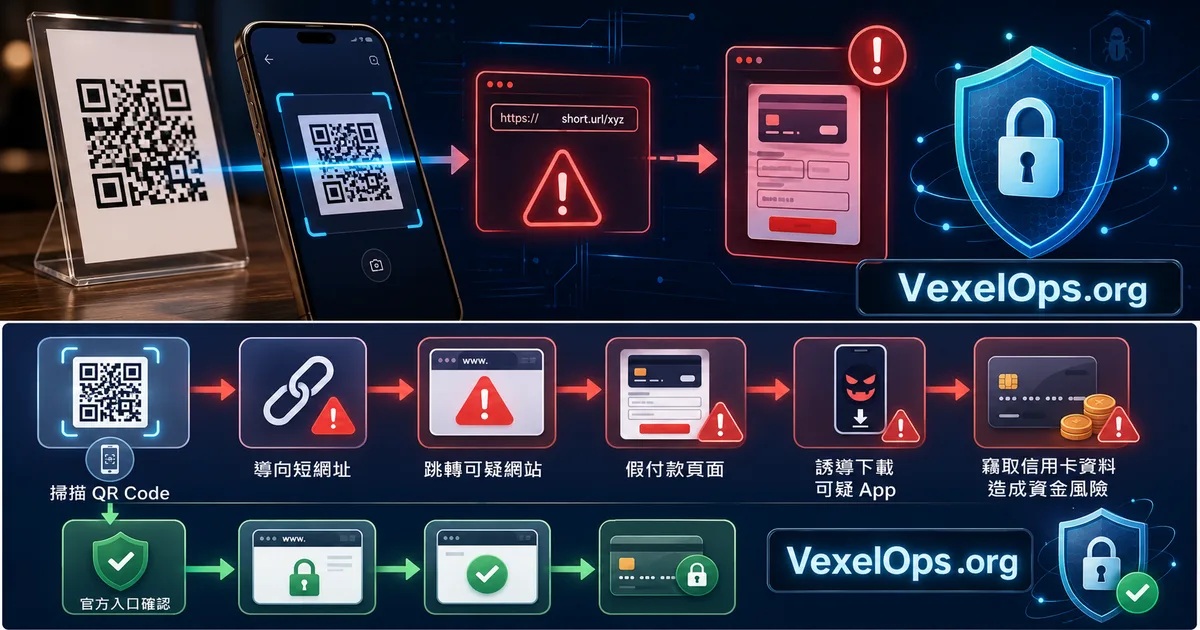
Now, QR Codes can be seen almost everywhere. In restaurants for ordering, parking payments, package collections, event registrations, Wi-Fi connections, electronic business cards, social media following, PayPal payments, and cryptocurrency wallet receipts, QR Codes are often used. QR Codes are not viruses, nor are they dangerous technology. Their function is simple: they convert information into a pattern that can be scanned by a mobile device. This information may be a URL, a piece of text, payment information, Wi-Fi settings, or an app download link. The real risk lies in whether the QR Code you scan is genuinely from the intended service provider. After scanning, does the page you open really belong to the official site? If the QR Code has been covered, swapped, or leads to multiple redirect links, users may unknowingly enter a fake website.
Malicious QR Codes Are Common in Everyday Scenarios
Malicious QR Codes do not necessarily appear in high-tech settings; they are often found in the most mundane places. For example, a QR Code for ordering on a restaurant table, if covered by a sticker, might lead customers to believe they are viewing the restaurant's menu while actually taking them to a fake payment page or phishing site. If a QR Code on a parking payment sign is replaced, users might input credit card details into a stranger's website. Package collections, customs fees, event registrations, fake coupons, and fake lottery entries could all be packaged as scanning processes. These types of scams are easy to succeed because the act of scanning feels so natural. Many people only check if the page design looks similar and do not inspect the URL. As long as the page resembles the official one, the amount is low, and the process seems smooth, it tends to make people lower their guard.
Technical Logic: QR Codes Are Usually Just an Entry Point
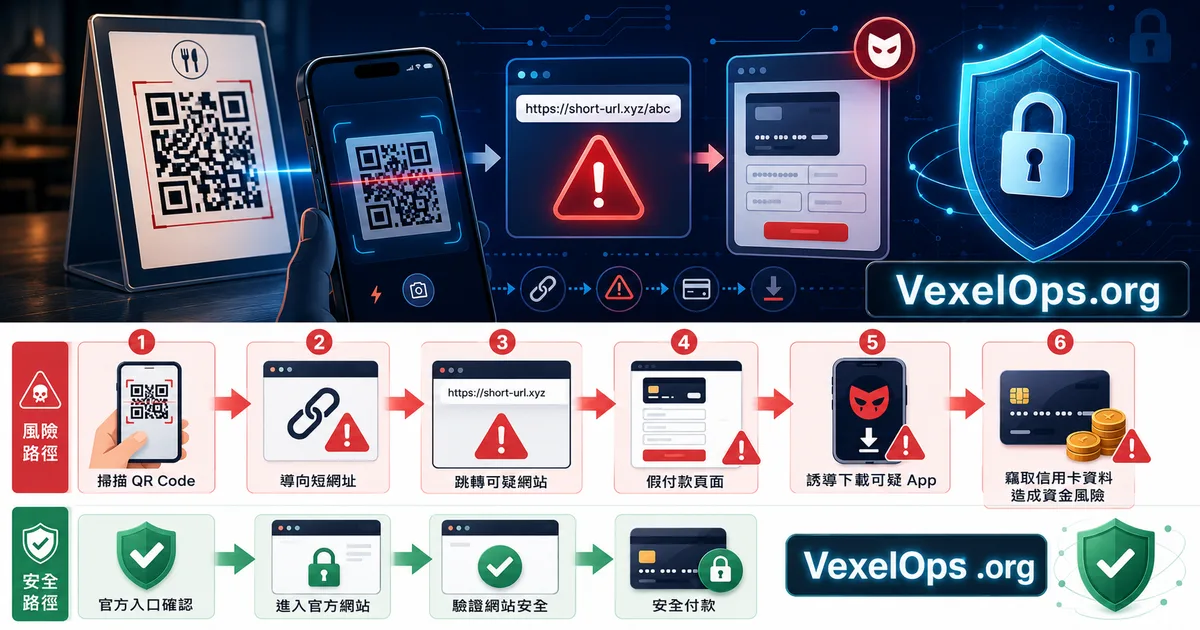
From a technical perspective, QR Codes are typically just entry points. They may point directly to a website or first lead to a shortened URL before redirecting to the actual page. This is why some QR Codes appear to direct to services like bit.ly, t.co, or other short-link services. Short URLs are not necessarily dangerous; many legitimate businesses use them for marketing tracking. However, the issue is that short URLs conceal the final destination. When users scan, they do not see where they will ultimately be directed, giving phishing sites, fake payment pages, and suspicious download pages more room to operate. Higher-risk scenarios include: 1. Scanning that requires entering full credit card details 2. Scanning that requests login into Google, Apple ID, Facebook, or bank accounts 3. Scanning that asks to download APKs, profiles, or unknown apps 4. Scanning that presents warnings like "account anomaly," "payment failure," or "verify immediately" 5. Scanning that redirects multiple times to unfamiliar URLs 6. Scanning that asks for SMS verification codes or email verification codes If a QR Code was initially meant to view a menu, pay for parking, or check event information,
Check URLs and Amounts When Making Payments via QR Code
Payment QR Codes require the most caution. Because once you input credit card information, bank details, or payment verification codes on a fake page, the subsequent handling can be troublesome. Before making a payment, conduct a few simple checks. First, verify that the URL belongs to a trusted platform. Second, ensure the page displays the correct business name. Third, check that the amount matches what is shown onsite. Fourth, do not input bank passwords, email passwords, or full verification codes on unknown pages. Some fake pages might deliberately request small payments, such as one dollar, a few dozen dollars in parking fees, or small additional amounts. While this amount may seem low, the real target could be your credit card information and subsequent verification codes.
Be Cautious When Scanning Codes That Require App Downloads
If scanning a QR Code prompts you to download an app, exercise extra caution. Typically, iPhone users should prioritize downloading from the App Store, while Android users should opt for Google Play or trusted sources. If you scan a code that leads to direct APK downloads, or asks you to ignore security warnings or activate unknown source installations, you need to be wary. Suspicious apps may request excessive permissions, like access to the camera, microphone, location, notifications, SMS, contacts, or accessibility services. If these permissions are misused, it could lead to account, notification, location, or device data breaches. Especially when you see phrases like "scan to claim prizes," "scan to install security tools," "scan for refunds," or "scan to recover accounts," do not solely focus on page design; go back to the official app or website to confirm.
If You've Scanned and Entered Data, First Assess What You've Inputted
If you have already scanned a suspicious QR Code, do not panic. The most important thing is to recall what data you entered. If you only opened a page without entering any data, the risk is usually low; you can close the page and clear your browsing history. If you entered credit card information, contact your bank or card issuer as soon as possible. If you entered passwords for Google, Facebook, Instagram, Apple ID, PayPal, or email, change those passwords from the official entry and check your login records. If you inputted SMS verification codes, bank verification codes, or payment verification codes, the risk increases significantly. You should immediately check transaction records and account security settings. If the incident involves payments, platform accounts, or multiple suspicious pages, you can compile the QR Code appearances, scanning times, URLs, page screenshots, and types of data entered for clearer follow-up.
Pause for a Second Before Scanning to Avoid Most Risks
QR Codes are a convenient tool, and it is not necessary to avoid using them entirely due to risks. What’s truly important is to develop the habit of checking URLs, page requests, and considering whether the scenarios make sense after scanning. When scanning a QR Code in a restaurant for ordering, it should not generally require you to log into your bank account. When scanning for parking payments, the page should have a clear association with the parking lot or payment platform. During event registrations or package collections, if a page suddenly requests downloading unfamiliar apps or inputting excessive sensitive data, you should stop and verify. The scanning process is fast, but safety assessments can be a bit slower. Many QR Code risks are not due to complex technology, but rather because people are accustomed to proceeding without a second thought after scanning. By taking a moment to double-check before entering passwords, payment data, or verification codes, you can avoid most fake payment pages and phishing websites.