
Messaging App Accounts are More Important than Many Think
Messaging apps like WhatsApp, LINE, Telegram, Signal, and Messenger are not just chat tools. Many people use them to contact family, friends, clients, and colleagues, as well as to receive verification codes, transaction notifications, work messages, group announcements, or important documents. If a messaging app account is hacked, the consequences may not only include the inability to log in. Attackers may impersonate you to borrow money from friends, send scam links, request verification codes, or use your account in original groups to gain more trust from others. Therefore, the security of messaging apps should not be overlooked. Like email and social media platforms, they are among the core accounts ordinary users most need to protect.
Never Share Your Verification Codes with Anyone
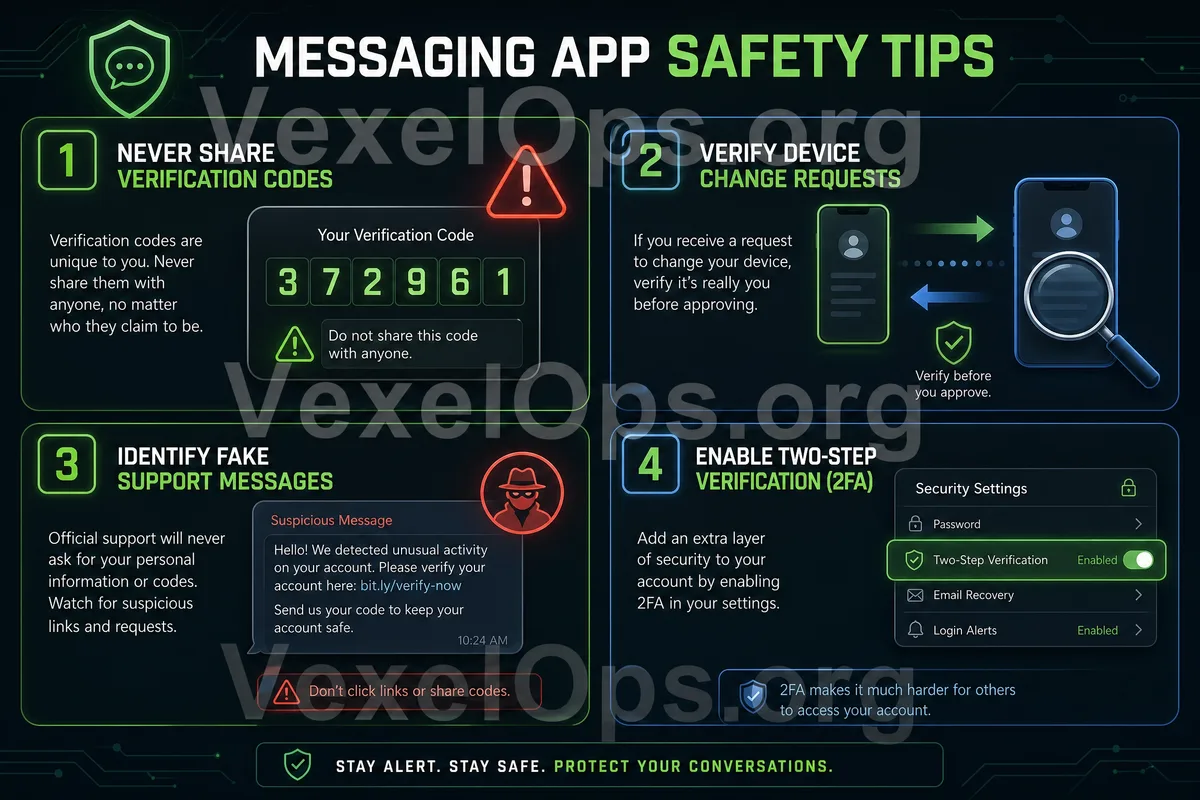
One of the most common risks with messaging app accounts is verification code scams. The other party may contact you through chats, calls, or fake customer service messages claiming: "I accidentally sent the verification code to your phone," "I need your help to provide the code," or "This is for account security confirmation." Such statements are very dangerous. Verification codes from apps like WhatsApp, LINE, and Telegram are usually used to confirm logins or transfer accounts. If you provide the verification code to someone else, they may try to log into your account, even forcing you to log out. Real customer service or platform personnel should never ask you for SMS verification codes, login codes, backup codes, or two-factor authentication passwords. If someone requests this information, you should stop the conversation immediately.
Confirm Account Recovery Methods Before Changing Phones
Many account issues occur when changing phones. Users may find themselves unable to log in properly, chatting history is not backed up, or the verification method is no longer available after switching to a new phone, clearing an old phone, changing numbers, or reinstalling the app. Before changing phones, it's advisable to confirm a few things: whether the phone number is still usable, whether the email can receive notifications normally, whether two-factor authentication is enabled, whether chat history needs backing up, and whether the old device can still log in. Different apps have different backup methods. For example, WhatsApp may involve backing up with Google Drive or iCloud; LINE also has chat history backups and account transfer settings; Telegram relies more on phone numbers and account security settings. Ordinary users don’t necessarily need to know all the details, but they should at least check official settings before changing phones and not wait until the old phone is cleared.
Be Wary of Fake Customer Service and Unknown Messages
Another common risk on messaging apps is fake customer service and unknown messages. The other party may impersonate platform customer service, bank personnel, logistics staff, investment advisors, group administrators, or people you know. Common phrases include account anomalies, package issues, payment failures, group verification, contest winnings, investment opportunities, and account restrictions. These messages often come with links requesting you to log in, fill out information, provide verification codes, or download apps. If you receive such messages, it’s best not to click links provided by the other party. When needing to confirm account or payment issues, directly open the official app, official website, or use the customer service entrance you are familiar with.
Avoid Clicking on Unknown Links and Files in Groups
WhatsApp, LINE, and Telegram all have group or channel features. While these features are very convenient, they can also be used to spread suspicious links, fake promotions, investment pitches, or unknown files. If someone invites you to join an unknown group and requests you to click links, download tools, join investment platforms, purchase gift cards, or transfer money in the group, you should be alert. Do not download unknown files directly either. Even if the file names look like photos, contracts, invoices, work materials, or event descriptions, you should first confirm whether the source is trustworthy. It’s especially important to avoid opening compressed files, installers, or external links sent by unfamiliar individuals.
Enable Two-Factor Authentication to Protect Account Logins
Many messaging apps offer additional security settings, such as two-factor authentication, PIN codes, login notifications, device management, or account protection options. These settings can reduce the risk of your account being accessed by others. For ordinary users, at the very least, they should enable available extra verification for commonly used messaging apps. Especially, Telegram’s two-step verification, WhatsApp’s two-factor verification PIN, and LINE’s account and login management deserve regular checks. Once enabled, remember to keep the recovery methods safe. Do not share your PIN, backup codes, or recovery information with anyone, and do not place them in chat records or albums where others can easily see.
If You Suspect Your Account is Hacked, Protect Friends and Groups First
If you notice unusual activity in your messaging app account—such as friends receiving strange messages from you, being unexpectedly logged out, or finding links in groups that you did not send—you should address the issue promptly. If you can still log in, first change security settings, log out of unknown devices, enable two-factor authentication, and check the account binding information. If you are unable to log in, follow the official account recovery process and do not trust strangers claiming they can quickly recover your account. At the same time, you can also inform your friends: If they receive requests from your account involving borrowing money, verification codes, investments, or suspicious links, they should not click or reply. This can help reduce the risk of your friends being scammed as well.
Messaging App Security Comes from Daily Habits
Messaging apps like WhatsApp, LINE, and Telegram are indeed practical tools, but real risks usually stem from leaked verification codes, fake customer service, unknown links, unfamiliar groups, and poorly managed account recovery information. Ordinary users can significantly reduce risks by remembering a few basic principles: Do not share verification codes with anyone, confirm account recovery methods before changing phones, do not log into unknown links, do not download unknown files, and enable available two-factor authentication. Messaging apps are an important communication gateway for you and those around you. Protecting them is not just about self-protection; it’s about safeguarding your friends, family, and group members as well.