
When Receiving an Unknown Login Alert, Don't Panic or Click on Any Links
Many people feel anxious when they receive alerts like "Your account has been logged in from a new device" or "Suspicious login activity detected." Especially for important accounts like Google, Gmail, Facebook, Instagram, Apple ID, Microsoft, and Telegram, an unknown device login can raise concerns about account theft. However, the most crucial first step is not to panic and click on all the buttons in the notification, nor to immediately trust messages claiming to offer "customer support." You need to first verify the source of the alert, then access the security settings through the official app or website. Scammers sometimes forge security notifications claiming that your Facebook, Instagram, or Google account has been logged in, urging you to click on "Appeal Now" or "Lift Restrictions" links. These fake notifications could lead you to phishing login pages. Therefore, the safest approach is to avoid logging in from unknown emails, SMS, Telegram, WhatsApp, or LINE links, and instead open the official app or type the official website in the browser.
Check the Login Devices and Locations First
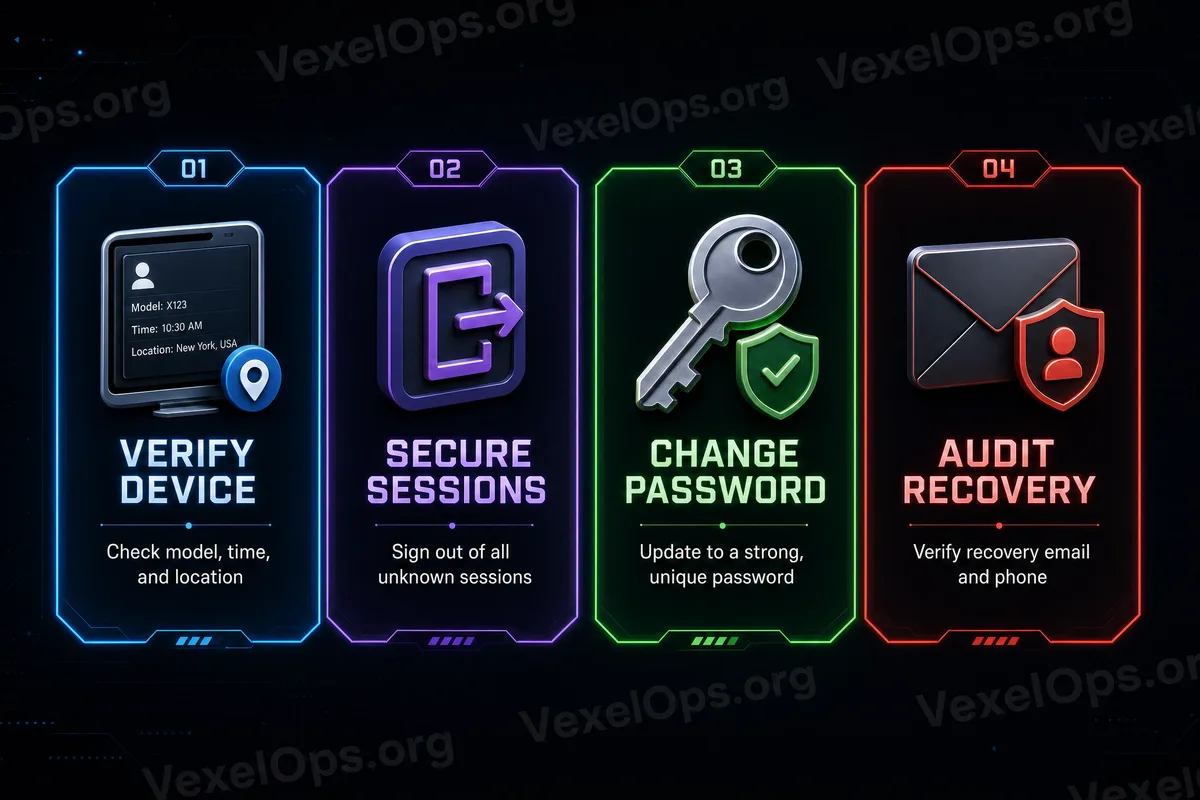
Upon entering the official security settings, the first thing to check is the login devices. Google accounts allow you to see recently used devices and security activities; Facebook and Instagram enable you to check login locations, account center, and security notifications. Pay attention to several questions: 1. Are there any devices (phones, tablets, or computers) you don’t recognize? 2. Is the login region obviously outside your usual activity range? 3. Did the login time occur just after you clicked a suspicious link? 4. Are there multiple failed login or password reset attempts? 5. Are there any unknown browsers, operating systems, or apps? However, the login region may not always be entirely accurate. VPNs, mobile networks, company networks, or public Wi-Fi can alter perceived locations. So, don't just look at city names, but also consider time, device, browser, and recent actions together. If you confirm an unknown device, you should immediately log out that device, then proceed to check your password and two-factor authentication.
Before Changing Your Password, Check Recovery Information
Many people think the first step after seeing an unknown login is to change their password. While this is essential, there’s another crucial task: confirming that your recovery email, backup phone number, and account recovery data are still yours. If an attacker has accessed your account, they may try to add their own recovery email, replace your phone number, or add new recovery methods. If you only change the password but do not check this information, they could still attempt to regain access through the recovery process. It's recommended to check: - Recovery email and phone for Google accounts - Email and phone number in the account center for Facebook / Instagram - Whether any unfamiliar emails have been added - Whether any old phone numbers that are no longer in use exist - Whether there are security notifications showing data has been changed - Whether there are unknown methods of two-factor authentication If you find that recovery information has been altered, you should first remove the unknown data, re-bind your safe contact methods, and then change your password.
Change Your Password, But Don't Just Change This One Platform
If an unknown login occurs on Google, Facebook, or Instagram, it indicates that your password may have been compromised, or you might have entered your information on a fraudulent login page. In such cases, you should not only change that platform’s password but also check other platforms where you used the same password. Many accounts are compromised not because of any issues with the platform itself but because users employ the same password across multiple sites. When data is leaked from a smaller website, attackers often use that set of emails and passwords to try logging into Gmail, Facebook, Instagram, TikTok, YouTube, PayPal, or other transaction platforms, which creates common collision risks. A safer approach is: use different passwords for each important account and utilize password managers like Google Password Manager, Apple iCloud Keychain, Microsoft Edge Password Manager, or trusted password management tools to check for duplicate passwords and data leak alerts.
Recheck Two-Factor Authentication, Not Just Whether It's Activated or Not
Many people have enabled two-factor authentication, but after an unknown login occurs, it still requires rechecking. This is because the method of two-factor authentication might have changed, recovery codes might have been viewed, or certain trusted devices may still retain login status. It’s advisable to first confirm: 1. Whether you are currently using SMS texts, Authenticator App, or security keys 2. Whether any unknown devices have been set as trusted devices 3. Whether there are unfamiliar recovery codes or login methods 4. Whether any old phones are still receiving verification notifications 5. Whether you need to regenerate recovery codes and store them securely SMS verification is better than having no two-factor authentication, but if your mobile number is at risk of SIM swap or eSIM transfer, Authenticator Apps or security keys are usually more stable. Important accounts should ideally not rely solely on SMS codes.
Third-Party App Authorizations Might Also Be Hidden Entry Points
In addition to passwords and login devices, it's essential to check third-party app authorizations. Many people use "Log in with Google" or "Log in with Facebook" to register for various tools, games, marketing platforms, AI tools, community scheduling tools, or browser plugins. Over time, accounts can accumulate many authorizations that are no longer in use. If a third-party app has excessive permissions, or comes from an untrusted source, it may increase data breach and account risks. You can check connected applications in Google accounts, Facebook settings, or Instagram settings, and remove any unfamiliar or unused services. Those who have ever used community growth tools, auto-posting tools, lottery tools, fan analytics tools, or unknown plugins should especially clean up authorizations regularly.
If Multiple Platforms Show Abnormalities, Organize a Timeline
If you only receive a single alert of an unknown login and find no other issues upon inspection, it could simply be an unsuccessful attempt. However, if Google, Facebook, Instagram, Telegram, Email, or transaction platforms show abnormalities at once, it’s crucial to organize the event timeline clearly. You can record: - The time of the first security notification - Which platform had abnormalities first - Whether you clicked on a suspicious link - Whether you input any passwords or verification codes - Whether there was an unknown device login - Whether there were modifications to your Email, phone number, or password - Whether there were unusual payment, advertising account, or private message content This information can help determine whether the issue started from Email, from a social platform, or from some phishing link or third-party app. If the events involve multiple platforms, data is chaotic or needs preparation for appeals, you can understand the digital security assistance process through VexelOps.org, VexelOps.net, or Telegram @vexelops, and clarify records of suspicious logins and account changes.
Treat Unknown Logins as a Comprehensive Security Check
Alerts for unknown device logins do not necessarily mean your account is entirely compromised, but they serve as an important warning. You don’t need to panic immediately or trust unknown customer service messages; what you should do is return to the official entry and check your login devices, recovery information, password, two-factor authentication, and third-party authorizations step by step. Account security cannot rely on just one password; it requires a comprehensive protective chain. Emails, phone numbers, recovery codes, login devices, third-party apps, browser plugins, every link can affect whether your account is secure. Treat this alert as a comprehensive check, as it can often block risks before actual takeover occurs.