
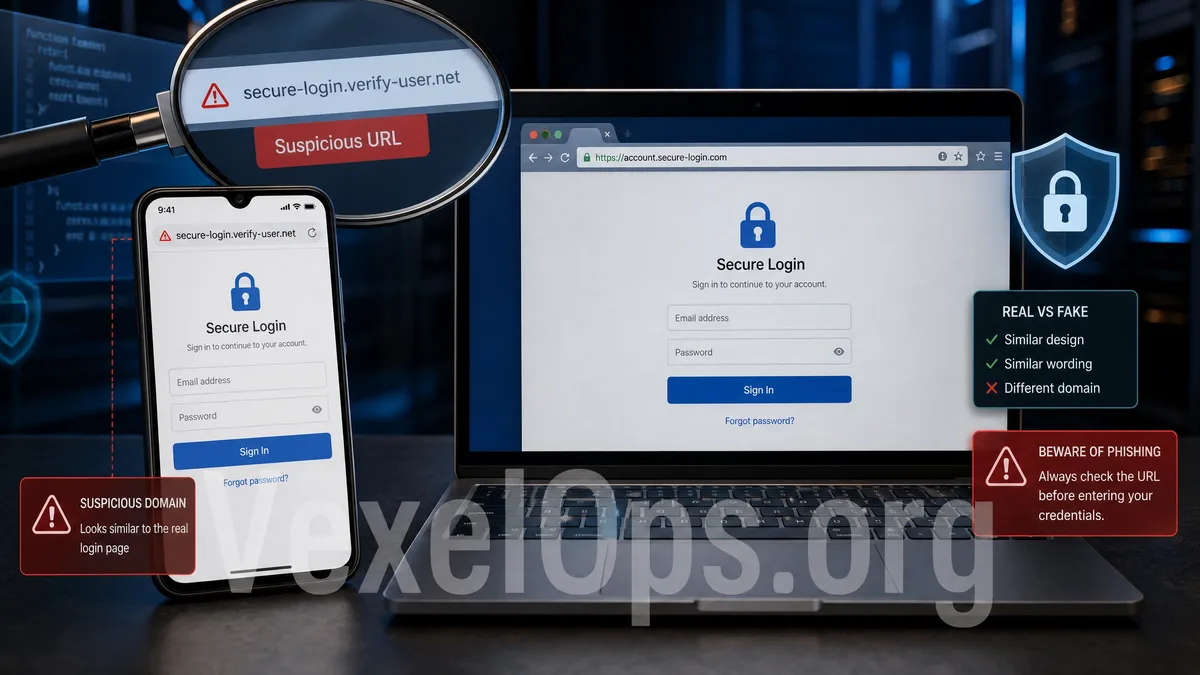
The Most Dangerous Part of Fake Login Pages is They Look Very Real
Many account theft incidents occur not because users’ devices are hacked by advanced hackers, but because they accidentally entered a fake login page. These pages can impersonate platforms like Google, Gmail, Facebook, Instagram, Apple ID, X, TikTok, Telegram, Discord, MetaMask, or cryptocurrency trading platforms, appearing very similar to official pages. The goal of phishing sites is usually straightforward: convince users that it is the official login page, so they willingly input their username, password, SMS verification code, Google Authenticator code, or even wallet recovery phrases or private keys. Once the information is submitted, attackers can attempt to log into the real platform, change the password, remove security settings, or request more information from victims. This is why cybersecurity protection is not just about installing antivirus software; it's more important to understand the fundamental logic behind fake login pages.
How Do Phishing Sites Make Users Believe They Are Real?
The first step commonly taken by phishing sites is to use similar URLs. This might involve adding an extra letter to the official domain, using confusing symbols, or incorporating brand names in subdomains, paths, or page titles. Users who only look at the page's appearance, without closely checking the URL, may mistakenly think they have entered the official site. The second step is mimicking the login interface. Fake pages may use similar colors, buttons, logo styles, prompt texts, and form layouts, making users feel familiar with it. Even if the visuals aren't identical, if the situation seems urgent—like "Account will be suspended," "Re-validation needed," "Payment issue," or "Security center notification"—many people let their guard down. The third step is to create pressure. Phishing messages may be sent alongside emails, SMS, Telegram, WhatsApp, LINE, or social media DMs, claiming that there is an issue with the user’s Facebook, Instagram, Google, or Apple ID that needs immediate attention. This sense of urgency may not give users enough time to carefully examine the URL and the source.
Fake Login Pages Don't Just Steal Passwords; They Can Also Steal Verification Codes
Many people believe that having two-factor authentication guarantees security. In reality, some phishing pages are designed with a multi-step process, first asking you to input your username and password, then requiring you to enter an SMS code, email verification code, or Authenticator code. From a technical perspective, fake pages may simply pass the inputted data to a backend system controlled by the attacker, who then tries to log into the actual platform. If you input the verification code on the fake page as well, they could potentially complete the login in a short amount of time. Therefore, the principle of verifying codes is straightforward: only input them in the official app or website that you have confirmed, and never provide verification codes to any customer service, chat partners, group admins, or unfamiliar sites.
How to Determine if a Login Page is Trustworthy?
Before entering any login page, you can perform a few simple checks: 1. Is the URL truly part of the official domain? 2. Did you navigate here from the official app, official website, or bookmarks? 3. Is it a link provided by a stranger through direct messages or group chats? 4. Does the page request unreasonable information, like recovery phrases, private keys, or complete credit card details? 5. Are there pressure tactics like "limited time to process," "failure to process leads to suspension," or "immediate removal of restrictions"? 6. Is it asking you to report verification codes in Telegram, WhatsApp, or LINE? If you're uncertain about the safety of the URL, try not to click on the link in the message directly but instead manually open the official app or type the official website URL in your browser. For important accounts like Google, Gmail, Apple ID, Facebook, Instagram, trading platforms, or cryptocurrency wallet services, it's even more crucial to avoid logging in through unfamiliar links.
What to Do After Entering Data?
If you suspect that you have inputted your username and password on a fake login page, it’s advisable to take security measures as soon as possible. First, log into your account through the official app or website and immediately change your password. Next, check login records, authorized devices, backup emails, mobile numbers, two-factor authentication settings, and links to third-party applications. If it involves platforms like Google, Facebook, Instagram, Apple ID, Telegram, or trading platforms, also check for any unknown device logins, password changes, replacement of notification emails, or removal of account security settings. If it's related to MetaMask, Trust Wallet, USDT, Bitcoin, Ethereum, or TRON transactions, you should also tidy up suspicious addresses, transaction hashes, and timelines. VexelOps can assist users in organizing phishing link incidents, preserving suspicious URLs and chat logs, structuring timelines of account anomalies, and preparing necessary data for subsequent platform appeals or security checks. If you're uncertain about what information to provide or what data should not be shared, you can reach out through VexelOps.org, VexelOps.net, or
Understanding the Logic of Phishing Pages to Better Protect Your Account
The key to phishing sites is not how mysterious the technology is, but how they exploit similar visuals, URLs, and urgent communication to make users voluntarily input sensitive information. By remembering a few principles, you can significantly reduce most risks: do not log in to important accounts from unfamiliar links, do not share verification codes with others, and do not enter wallet recovery phrases or private keys on any web page. Once you understand the operational logic behind fake login pages, it becomes easier to pause and check when you see suspicious emails, SMS messages, Telegram DMs, Facebook comments, or Instagram notifications. Genuine effective security habits often do not involve complex tools but require simply confirming the source before inputting your password.