
Your Phone Number may be the Last Line of Defense for Many Accounts
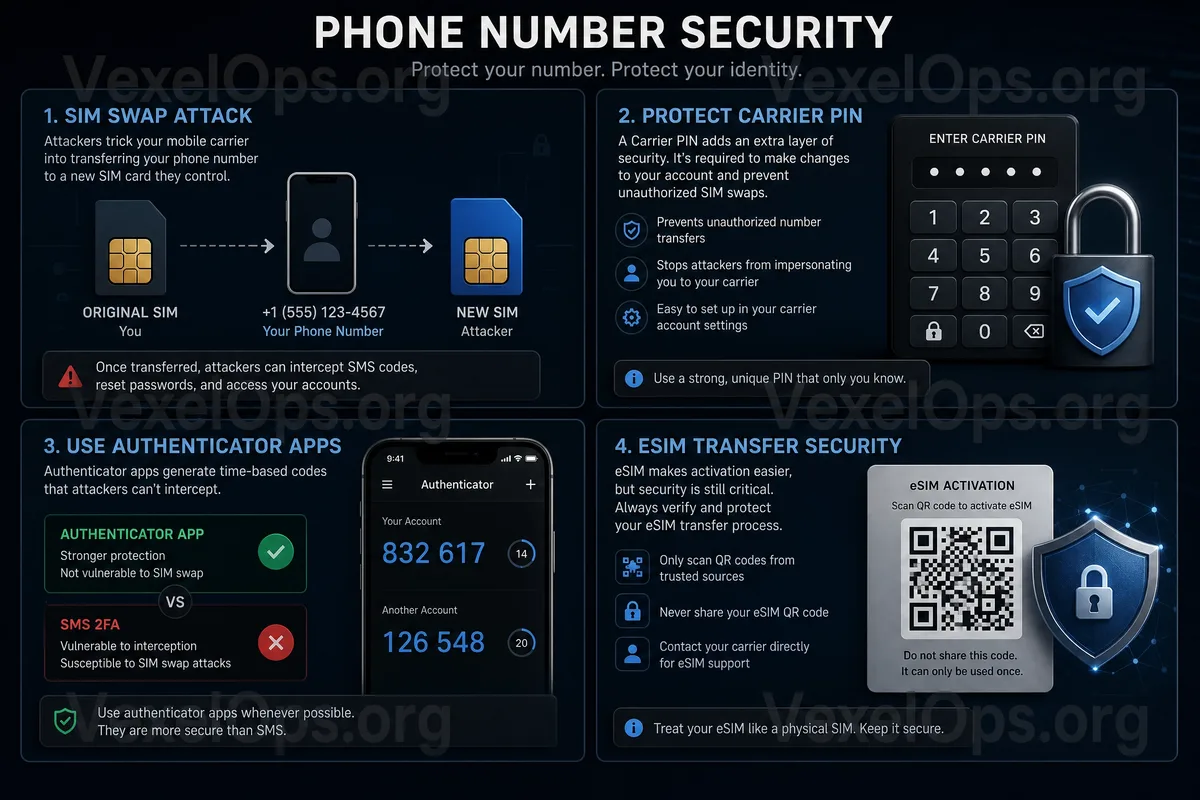
Many people think of passwords, two-factor authentication, and email security when protecting accounts, but often overlook the phone number itself. In reality, a phone number may be linked to Google, Gmail, Apple ID, Facebook, Instagram, Telegram, WhatsApp, LINE, bank apps, trading platforms, and even cryptocurrency exchanges. This signifies one thing: if someone else gains control of your phone number, the risk is not just about being unable to make calls, but the other party may receive SMS verification codes and attempt to reset passwords, log into accounts, or take over communication tools. SIM Swap refers to when an attacker somehow transfers your phone number to another SIM card or device. Now, with eSIM becoming increasingly common, number transfers do not necessarily require a physical SIM card; sometimes they can be completed through online processes, QR codes, or telecom account operations. For the average user, it is unnecessary to understand too many telecommunications details, but it is crucial to know that your phone number itself is already an important identity verification tool.
What Anomalies Might Occur After Your Phone Number is Swapped?
The most common first anomaly is that your phone suddenly has no signal. You might notice that your phone, which was functioning normally, is now out of service, unable to make calls, or receive SMS messages, and rebooting it does not help. Next, you may receive email notifications warning that someone is attempting to log into, reset the password for, or change security settings on your Google, Facebook, Instagram, Telegram, or other accounts. Some people only realize that their phone number may have a problem after being logged out of their accounts. Signs to watch for include: 1. Phone suddenly has no service, while others around you are fine 2. Unable to receive SMS verification codes or bank notifications 3. The telecom account shows SIM card or eSIM changes that you did not apply for 4. Gmail, Apple ID, Facebook, Instagram shows unfamiliar login alerts 5. Telegram or WhatsApp requires verification of your phone number again 6. Bank apps, trading platforms, or payment accounts show unusual notifications 7. You receive notifications like "Your number has been activated on a new device" or similar alerts. These situations do not automatically mean SIM Swap has occurred, but
Why SMS Verification Codes Should Not Be the Only Protection?
SMS verification codes are convenient, which is why many platforms still use them to verify identity. However, the problem with SMS is that it relies on the phone number. If the number is swapped, the verification code may end up on a device controlled by an attacker. This is why it is advisable not to rely solely on SMS verification for important accounts. For Google, Apple ID, Microsoft, Facebook, Instagram, exchanges, or financial accounts, it is recommended to prioritize using more secure verification methods such as Authenticator Apps, hardware security keys, device notification confirmation, or backup codes provided by the platform. Of course, no verification method is entirely without risk. Tools like Google Authenticator, Microsoft Authenticator, Apple iCloud Keychain, and Google Password Manager also need to be protected properly. But compared to solely relying on SMS, it at least reduces the risk of losing all accounts with one single phone number transfer.
eSIM is Convenient, But Account Security Must Keep Up
The advantage of eSIM is that there is no need to insert a physical card, making it more convenient to change phones, travel, or activate additional lines. However, this convenience also means users need to protect their telecom accounts likewise. If your telecom provider supports online management of your number, reissuing eSIMs, transferring devices, or viewing bills, this telecom account should be taken as seriously as your email account. Avoid using overly simple passwords, don’t share passwords with other sites, and check if you can set up additional verification, customer service PINs, account management restrictions, or security options to prevent unauthorized transfers. Some users protect only their Google and Facebook accounts but completely ignore their telecom provider accounts. As a result, attackers do not need to breach social platforms; they can simply transfer the number and start receiving verification codes to attempt further operations on other accounts.
If You Suspect SIM Swap, Here Are the First Steps You Should Take
If you suspect your phone number has been swapped, the order of actions is crucial. The first step should be to contact your telecom provider to confirm whether your number has been replaced, transferred, activated with eSIM, or if there are any suspicious actions. You can use another phone to contact customer service or visit a store to confirm your identity and suspend suspicious activities. Next, check your important accounts through official channels—do not click on login links in strange SMS or emails. Prioritize checking: - Security activity for Google/Gmail accounts - Device lists for Apple ID - Login locations for Facebook and Instagram - Whether Telegram or WhatsApp has been re-registered or logged out - Bank, payment tool, and trading platform login records - Email settings for auto-forwarding or unfamiliar backup addresses If you can still log into your account, immediately change your password, remove any unknown devices, and update backup emails and two-factor authentication methods. If you can no longer access the account, outline a timeline of events and go through the official recovery process to file a complaint.
How to Reduce the Risk of Phone Number Abuse Regularly?
The most practical approach is to downgrade your phone number from a "unique verification method" to a "secondary verification method." For important accounts, use Authenticator Apps, security keys, or platform-built device confirmations as much as possible, rather than relying solely on SMS. At the same time, you can implement a few basic settings: 1. Use a unique high-strength password for your telecom account 2. Ask your telecom provider if you can set up a customer service PIN or anti-transfer protection 3. Do not publicly post your phone number on social platforms 4. Avoid linking the same number to too many high-value accounts 5. Regularly check login devices for Google, Apple, Facebook, Instagram 6. Never provide SMS verification codes to any customer service, friends, or strangers 7. Keep backup recovery codes for important accounts and store them securely. Your phone number is not off-limits; rather, don’t place all your security on a single SMS code.
Manage Your Phone Number as a Part of Account Security
SIM Swap and eSIM transfer risks remind us that account security does not only exist within websites and apps but is also related to your phone number, email, telecom accounts, and backup data. When your phone suddenly loses signal, SMS messages do not arrive, or important accounts show abnormal notifications simultaneously, do not simply assume it’s a signal issue; you should verify the status of your number and account login records as soon as possible. If the event has already involved multiple platforms, such as Gmail, Telegram, Facebook, Instagram, banks or trading platforms showing issues at the same time, it is advisable to organize the timeline of events, notification screenshots, account change records, telecom provider responses, and suspicious login information. The more complete the data, the easier it will be to clarify the source of the issue and the order of processing when reporting to platforms, communicating with telecom providers, or seeking digital security assistance.