

Panic is Another Ally for the Attacker
After an account is hacked, time is indeed critical; however, acting hastily is often more dangerous than inaction. Continuously trying incorrect recovery methods without understanding the situation can trigger the platform's account lockout mechanism, making the subsequent claims process more difficult. If you only address one account without knowing the extent of the incident, the attacker may maintain access through another already compromised account. Hastily changing all settings without preserving evidence may delete important records needed later. The first step is not to act immediately, but to take a few minutes to clarify the current situation.
Answer These Three Questions First
Before starting any action, confirm the answers to the following three questions: Can you still log into this account? Being able to log in or not represents entirely different paths for handling the situation. If you can still log in, it means the attacker may not have changed the password yet, giving you a chance to complete critical security settings before they act. If you can no longer log in, the recovery process will need to occur through the account recovery channels, rather than directly within the account. What recovery methods are still available? Your backup email, linked phone number, trusted devices are the most crucial resources for account recovery. Before taking any actions, confirm which methods are still available and which have already been changed. How extensive is the impact of the incident? An account being hacked is often not a single incident but part of a series of intrusions. Check if there are other accounts showing signs of abnormality simultaneously, such as whether the linked email has any unknown logins, or whether other platforms have received password reset notifications.
If You Can Still Log In, Address These Steps in Order
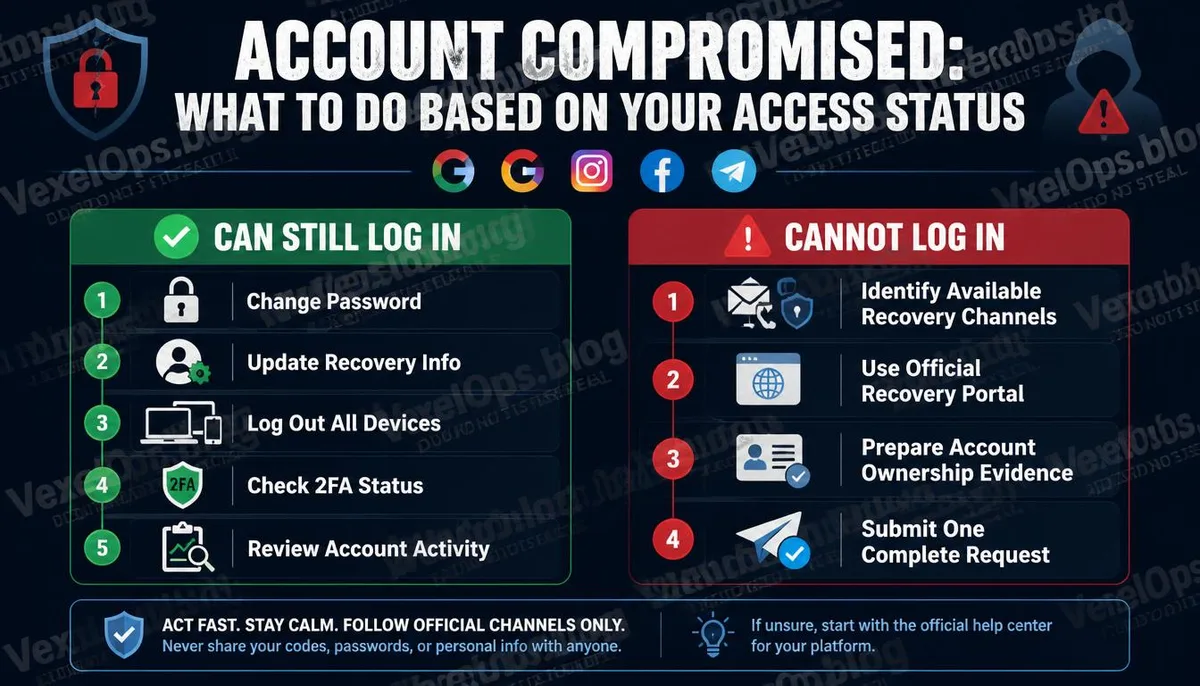
If you can still log into your account, this time is the most valuable. You need to complete the most important actions before the account can be fully taken over. First: Change Your Password Immediately Use a new, strong password that you have never used anywhere else, preventing the attacker from continuing to use the same credentials to try other platforms. Second: Check and Update Recovery Information Check if the backup email and phone number in your account settings are still accessible. If they have been changed, immediately correct them with the right information. Third: Log Out of All Other Devices Most mainstream platforms offer an option in account settings to log out of all devices. Performing this action can forcibly terminate the current login session for the attacker, even if they have access on one device. Fourth: Check the Status of Two-Factor Authentication Verify whether two-factor authentication is still enabled and whether the linked verification methods are still valid. If two-factor authentication has been disabled, re-enable it right away. Fifth: Review Recent Account Activity Check login records, authorized third-party applications,
If You Can No Longer Log In, Here are the Recovery Channels for Each Platform
Being unable to log in means you need to go through the account recovery process, with the entrances for each platform as follows:
- Google: Visit accounts.google.com, select forgot password, and follow the system prompts to attempt available verification methods.
- Instagram / Facebook: On the login page, select forgot password, Meta offers multiple identity verification methods, including video selfie verification.
- Telegram: After reinstalling, enter your phone number; the system will send a verification code to the linked number. If the number is unavailable, you must apply through official support channels.
- Apple ID: Go to iforgot.apple.com and select a recovery path based on the availability of trusted devices or phone numbers.
- Microsoft: Visit account.live.com/password/reset and verify using the backup email or phone number.
During the claims process, you will need to provide information that can prove ownership of the account. The more complete your preparation, the faster the review will be. Further reading: After your account is hacked, how can VexelOps assist?
Common Mistakes in Responses
Repeatedly Submit Claim Forms Submitting the same claim multiple times will not expedite the review process; in fact, it may lead the system to classify subsequent submissions as duplicate requests and automatically reject them. Submit a complete claim once, wait for a response, and then decide the next steps based on that response. Seeking Account Recovery Assistance from Third-Party Websites Third-party services that claim to help you recover your hacked account are scams in most cases, exploiting the urgency felt after an account hack. Account recovery must be conducted solely through the official platform's formal claim channels. Only Address the Most Obvious Account Account hacks are rarely isolated incidents; attackers often use acquired access to try other related accounts. Only fixing one account without checking the status of other related accounts might allow the attacker to maintain another entry point.
FAQs About Handling a Hacked Account
Should I Immediately Notify My Contacts After My Account is Hacked?
Yes, and the sooner, the better. One of the common actions taken by attackers after gaining access to an account is sending fraudulent messages or malicious links to your contacts, utilizing your identity to lower their guard. Proactively notifying your primary contacts about the abnormal status of your account helps keep them wary of any unusual messages coming from your account, significantly reducing the likelihood that they will become collateral victims. You can notify them through alternative means, such as direct phone calls or texts, rather than through the hacked account itself.
What Else Should I Do After Recovering My Account?
Recovering access to your account is just the first step, not the end. After recovery, systematically confirm whether the account settings have been altered, including forwarding rules, authorized third-party applications, backup contact methods, and any notification settings related to the account. You should also verify whether the attacker conducted any actions under your name while they controlled the account, such as sending messages, making purchases, or changing settings for other linked accounts. Completing these checks means that the entire account recovery process has truly been fulfilled.
Should I Report the Hacked Account to the Police?
It depends on the nature and extent of the incident. If the account hack was merely a simple intrusion without involving financial loss or personal information being used for fraud, reporting may have limited practical results in terms of pursuing an investigation, but it still establishes a formal record of the incident. If the hack involved financial loss, personal information used for fraud against others, or if there is good reason to believe that a specific person is the attacker, making a report is even more meaningful. A complete timeline of events, communication records, and screenshots of account activity are the most important preparatory materials when filing a police report.
One Key Takeaway: The most important thing after an account is hacked is not speed, but order. After clarifying which channels are still accessible and which events have affected which accounts, it is more effective to handle matters in the correct priority order than to randomly try various methods in a panic, and it also makes it less likely for the situation to become more complicated.