
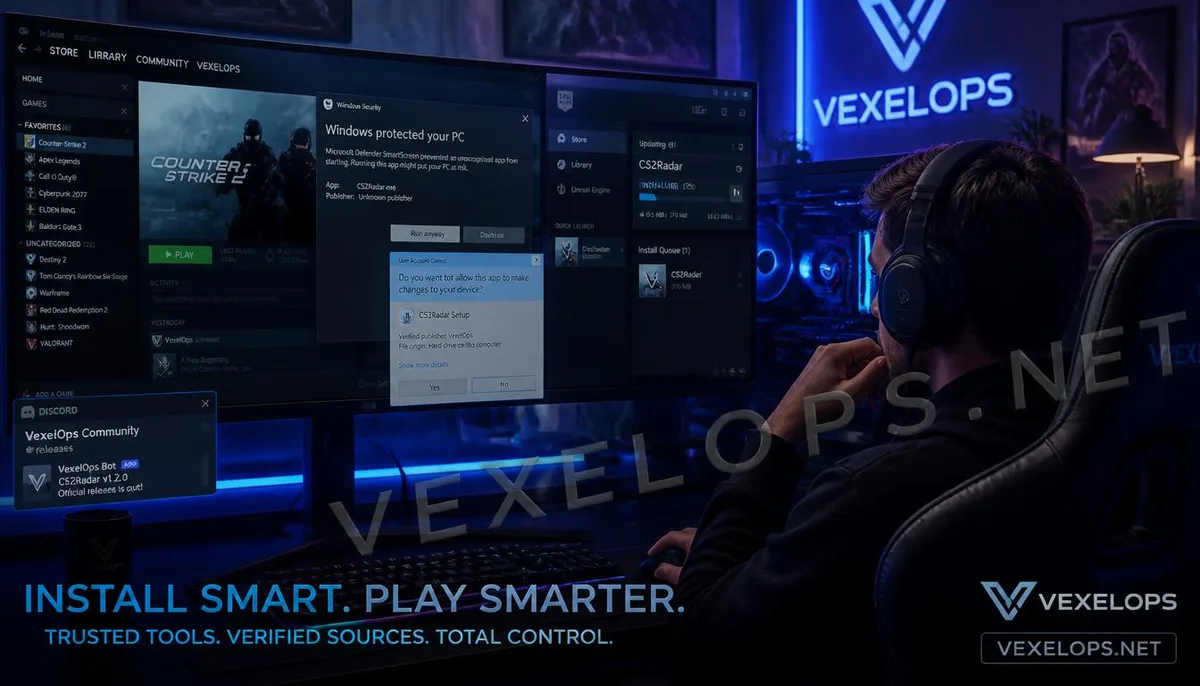
Why Should You Be Especially Cautious with Free Game Exploits?
Many players searching for game exploits often come across terms like "free," "latest version," or "one-click use". These descriptions can be very appealing to players, as they represent obtaining additional features without spending money and seem easy to install. The issue is that game exploits do not come from the same trusted sources like Steam, Epic Games Store, or official game updates. There could be numerous repackaged or modified installers available online, and some may even be malicious software disguised as popular game tools. Especially for popular game exploits, the higher the search demand, the easier it is for attackers to create counterfeit download pages. Websites may use familiar game logos, version numbers, user reviews, and download counts to make the entire page look quite professional, while the actual files downloaded may have nothing to do with game functionality. Therefore, when determining whether game exploits are safe, you should not focus solely on the download count or whether the website looks genuine. It’s more important to confirm the author's source, file type, installation method, community feedback, and what permissions it actually requires
Why Do Exploits Often Require Administrator Permissions?
Administrator permissions in Windows allow a program to perform operations at a higher level than a regular user. Thus, some tools that need to modify game files, install system components, or interact with other programs may legitimately request elevated permissions. However, needing administrator permissions does not mean that the program is necessarily safe, nor can you assume it's a virus simply because it requires such permissions. What is truly worth paying attention to is why it needs this permission and what it intends to do once granted. For example, a simple game settings tool that only modifies visual options should not require full system administrator permissions, which warrants further investigation. Conversely, if a tool needs to install legitimate system components and the author explains the installation reasons clearly, then the permission request may have reasonable technical justification. Players can check the program name, developer, download source, and file contents before executing the installer. If a website fails to provide any of this information and merely prompts you to keep clicking "Allow" or "Run as Administrator," then you shouldn't overlook
Is it Normal to Need to Disable Antivirus Software to Use It?
This is a very important signal when downloading game exploits. Some game tools might be flagged by Windows Security or other antivirus software due to their unusual behavior. For instance, certain tools interact with the game program, which may raise a higher level of alert from security software. However, players should not conclude, "It's a false positive, so I just need to turn it off". If an unfamiliar website prompts you to fully disable Windows Security before running the downloaded .exe file, you should stop there. Once your safety measures are disabled, actual malicious programs may be able to execute more easily on your system. A more reasonable approach is to first confirm the detection name shown by the security software, file source, and developer information. If you cannot identify what the file is, you shouldn't just disable security measures for the sake of successful installation. Also, don’t consider, "Many players say to disable antivirus" as a safety assurance. Popular tools can be repackaged too, and a version that was safe in the past does not guarantee the version from an unfamiliar website is still safe.
How to Distinguish Real Game Tools from Imposters?
Trustworthy game tools usually provide complete developer and version information. You should be able to know who made it, what game versions it currently supports, and where to obtain updates if issues arise. In contrast, impostors often rely on the psychology of "quick usage". The download page might emphasize instant activation, free unlocking, or the latest version, but rarely explain the technical content of the program itself. When you go to install, it might suddenly request administrator permissions, urge you to close antivirus software, or even require you to download completely different-named programs. If the file source does not match the program name, it's a cause for concern. For instance, if you download a mod for a certain game only to find the installer requires you to run a system tool unrelated to that game, it’s time to double-check. You can quickly check a few items before downloading:
- Can you confirm the identity of the developer or author?
- Is there an official project page or a trustworthy community source?
- Does it clearly list the supported game versions?
- Does the file name match the content of the download page?
- Does it suddenly ask to disable security measures?
- Does it require administrator permissions unrelated to functionality?
- Have other players reported account or system abnormalities?
These checks don’t take long but can help avoid many situations where "downloading a game tool ends up installing a strange program".
What Could Happen If Your Account Gets Stolen After Downloading an Exploit?
Game exploits themselves are not necessarily account theft tools, but if players download and execute unfamiliar programs from untrusted sources, their account security could be compromised. One possible scenario is that malicious software attempts to access sensitive data in your browser. If a player is logged into Steam, Discord, Email, or other services in their browser, and the malware has sufficient permissions, it might try to access exploitable information. Another situation is that the player downloaded something completely different than the intended game tool, but instead received a malicious program disguised as an exploit. It might run background operations, and players may only realize something is wrong when they see unusual login notifications, password changes, or unexpected security alerts. If you suddenly receive numerous strange login notifications after installing an exploit, your first step should not be just to reinstall the game. Instead, use a trusted device to access Steam, Discord, Email, or other related accounts to check recent login activities and security settings. If you notice unfamiliar devices or unusual actions, you should change your

Common Questions About Downloading Game Exploits, Permissions, and Account Security
Why Do Some Exploits Require Administrator Permissions?
Certain game tools may require higher permissions than regular applications due to the necessity of modifying specific files, installing components, or interacting with game programs. However, this does not directly prove the program's safety, nor should permission prompts alone be used to determine if it's malware. A more reasonable approach is to consider the permission requirements in conjunction with the tool's functionality. If a tool's capabilities are simple but it demands very high system permissions, and the author has not provided a clear explanation, caution should be exercised. Confirming the download source, developer information, and other user feedback should also be part of the process.
Does Antivirus Software Detect Exploits Mean They're Always Viruses?
Not necessarily. Some game tools may behave differently from standard applications, causing security software to conduct more stringent detections. However, this should not be an excuse for users to disable antivirus software directly. If Windows Security or other security tools issue a warning, check the detection name and source of the file before ensuring the developer has provided any public explanations. If the file originates from an unfamiliar website and requests the user to disable their security protections, these two signals should prompt additional caution. Do not trust a file solely based on someone in an online comment section claiming, "It's a false positive." Truly safe determinations require more source and background information about the file, rather than relying on just one comment.
Can Game Exploits Directly Steal Steam or Game Accounts?
It's possible, but not all exploits have that capability. The real risk primarily comes from what program you execute and the permissions it obtains. If an exploit turns out to be a disguised malicious program, it may attempt to obtain browser data, account information, or other sensitive content. Particularly when users are logged into significant services such as Steam, Discord, Email, etc., the repercussions of malware might extend beyond the game itself. Therefore, if unexpected logins, password reset notifications, or unfamiliar devices appear after executing a strange exploit, treat the situation as an account security incident rather than continuing to use the tool to see how it plays out.
One Key Takeaway: Game exploits are not inherently dangerous, but unknown sources, excessive permissions, and demands to disable antivirus are all signals that need careful verification before downloading.