

This isn’t a hypothetical issue. This report actually exists, scattered across different companies' servers, not presented in a format you can directly access. A digital footprint is the sum of all traceable information you leave while using online services, either actively or passively. Some of it is explicitly provided by you, such as the account information you fill out and the posts you publish. More of it is recorded without your awareness, such as how many seconds you lingered on a page, at what location you opened a certain app, and what time you showed interest in a product.
What Does Your Google Account Record?
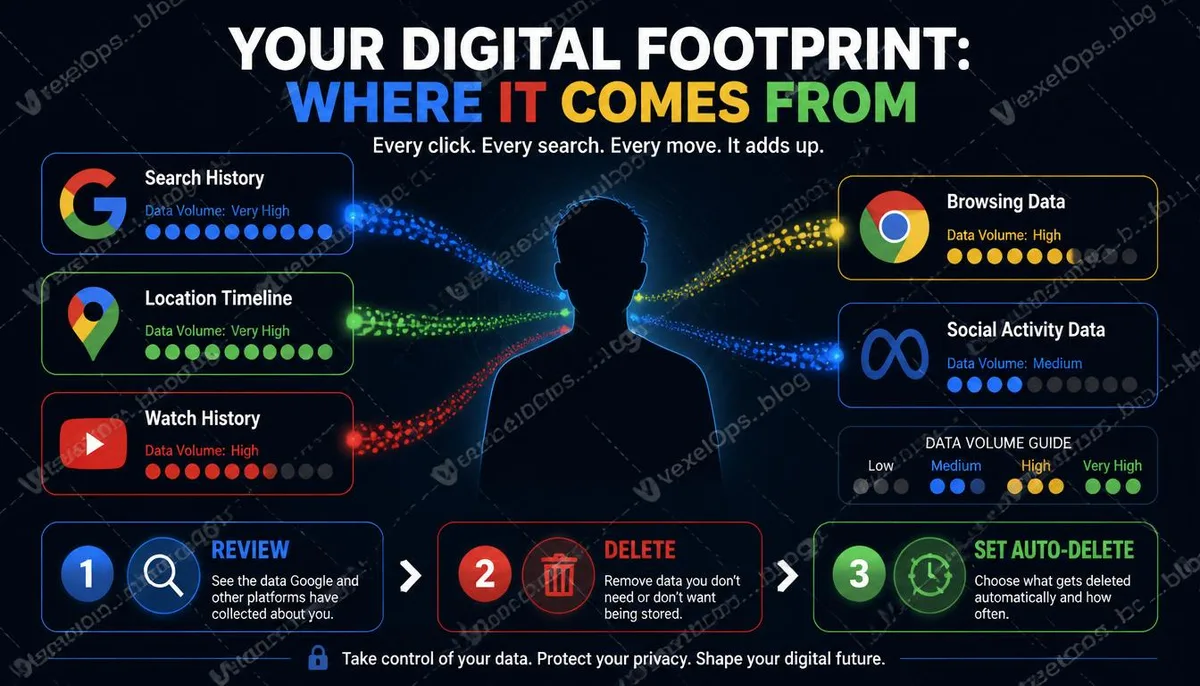
Google provides a page called My Activity, found at myactivity.google.com, allowing users to view activity data recorded under their account. The content on this page can be a surprising experience for most people. It includes your Google search history, precise to the time and content of each search. YouTube's watch history shows how long you watched and where you paused. If you have enabled location tracking, Google Maps may retain your daily movement trails, detailing specific locations and durations. Google Assistant's voice command history may appear here if you have spoken to the Assistant.
Location Data is the Most Sensitive Part of Your Footprint
Location data differs fundamentally from other types of information; it reveals not just what you have done, but who you are and what your life looks like. Where you are every morning at eight a.m. signifies where you live or your workplace. Your regular weekend spots indicate your social habits and personal preferences. Whether you have lingered near a healthcare facility or specific institution can allow inferences about your health status or other personal information. Google's location timeline, along with the "significant locations" feature on the iPhone, are two of the most comprehensive sources of location data collection on personal devices. Both provide options for clearing and disabling, but they require active access to settings, with the default being enabled.
Browsers are Another Major Source of Footprints
Chrome's browsing history is stored locally, and if you log into your Google account and enable sync, this history also exists on Google's servers. In addition to browsing history, Chrome also records your autofill data, including addresses, phone numbers, and saved passwords you have entered in forms. This information can be directly viewed on your device and the clearing option can be found in Chrome's privacy and security settings. Incognito mode does not store browsing history locally, but that doesn’t mean there are no footprints at all; internet service providers can still see which domains you connect to, and the sites you visit can also see your IP address. Further reading: Does incognito mode really leave no traces? Many people misunderstand this browser feature.
Social Media Platforms Store More Data Than You Post
Facebook and Instagram offer a feature to download personal data, allowing users to access a backup of what Meta currently holds about them. This backup includes all content you have posted, messages you have sent and received, your search history, advertising interaction history, and activity data from outside the platform, namely web behavior collected by the Meta Pixel on other sites. Downloading this backup often provides the first true realization of the scale of one's digital footprint. The option for downloading or transferring information can be found under the information options on the settings page.
Directions to Proactively Reduce Your Footprint
Completely eliminating a digital footprint in today's internet environment is nearly impossible, but managing its scale and scope is something every user can undertake. Here are a few adjustments you can start with right now:
- Set automatic deletion in Google My Activity, choosing a retention period of three or eighteen months
- Disable location tracking in Google Maps or set automatic deletion
- Regularly clear your browser's cookies and cache
- Check location permissions for each app on your phone, allowing only when necessary rather than always
- Regularly visit the authorized apps page of your main accounts to remove third-party authorizations you no longer use
Common User Questions About Digital Footprint Management
If I delete my Google search history, will Google really not know what I searched for?
Deleting search history on the My Activity page will remove that data from your account’s visible record, making it invisible to you and preventing it from being used for personalized advertisements. However, whether Google retains this information in deeper system logs, and for how long, is not fully transparently disclosed in its public privacy policy. What is certain is that deleting records in My Activity is better than not deleting, as it does reduce the extent to which that data is directly used to build your personal profile.
Does using different search engines, like DuckDuckGo, reduce my footprint?
It can, but it reduces only specific types of footprints. DuckDuckGo's design principle is not to record user search histories and personal information, meaning your search behavior will not be used to build personal profiles or serve personalized ads. However, switching search engines does not impact other types of footprints; your internet service provider can still see your traffic, the sites you visit will still record your IP address, and your behavior data on social media platforms will continue to be collected. Search engines are just one source of footprints; switching to privacy-focused search engines is worth considering, but their effect should be understood within the overall context of footprint management rather than as a standalone solution.
Will data on my old phone completely disappear after I get a new one?
It depends on your data backup settings and how you handle your old phone. If you back up phone data using Google Account or Apple ID, that data still exists in the cloud, independent of the phone itself. Data on the old phone itself is typically erased after a factory reset, but for those with specific data recovery needs, the degree of erasure after a factory reset isn't technically equal to being completely unrecoverable, especially on older devices. If you are selling or discarding your old phone, beyond a factory reset, it’s advisable to ensure that the cloud account is fully signed out and all linked accounts are removed as part of a thorough processing procedure.
One Key Takeaway: Digital footprints are not an abstract concept; they are concrete data accumulated from your daily online behavior, scattered across various platform settings, waiting for you to review, clean, and manage.