
Instagram's messaging system is designed to be very open; any account can send you a message request without needing to follow you first. This makes genuine human connections easier, but it also allows accounts with specific purposes to reach a large number of users at a low cost. Understanding messaging risks isn't about making you fear all messages from strangers, but helping you develop a framework for judgment when facing different types of contact.
Common Messaging Risk Patterns
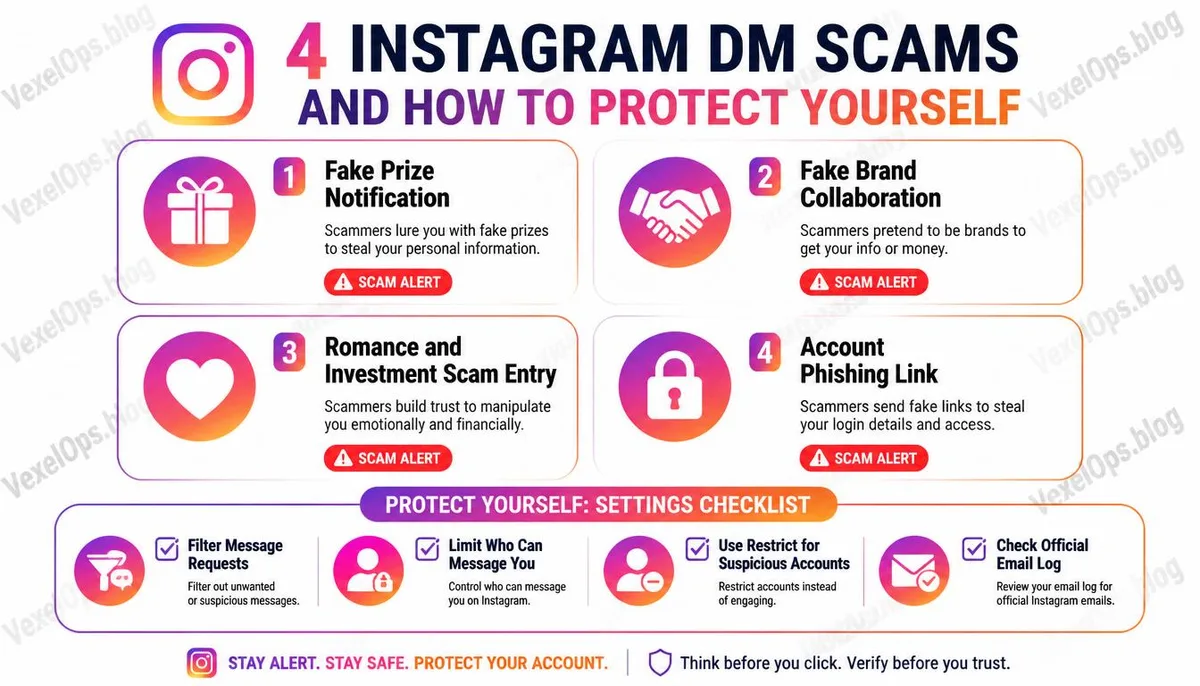
Free Gifts and Lottery Notifications You receive a message claiming that you've won a lottery from a certain brand and need to click a link to provide shipping information or verify your account. These messages sometimes mimic the visual style of real brands, using seemingly official language that lowers your guard. Real brand lottery notifications will not ask you to go to external links for account verification nor require you to input your Instagram password during the process. Fake Collaboration Invitations For creators and accounts with a certain number of followers, fake collaboration invitations are a common attack vector, often leading to Instagram creator accounts being hacked. The sender claims to represent a certain brand or organization, offering a collaboration opportunity and attaching a contract or product description link that is actually a phishing page designed to steal account cookies. Further reading: What Happens When a YouTube Account is Hacked? Common Security Settings Creators Overlook. Starting Point for Romance and Friendship Scams Some more patient scammers initiate long-term contact through messaging, not rushing to ask for anything but
How to Identify Problematic Messages
There isn't a universal judgment standard, but several specific observations can serve as references: If the sender's account is relatively new, the ratio of followers to following is abnormal, and personal information lacks specifics, these combinations warrant a pause for consideration. Messages that create a sense of urgency, such as limited-time offers, impending account closures, or exclusive opportunities only for you, are designed to provoke immediate actions without allowing for calm assessment. Any messages that request you to click external links and log into your account, regardless of whether they come from strangers or accounts that appear to be friends, should prompt confirmation of the target URL before clicking. Instagram's official domain is instagram.com; any slight differences indicate that it is not an official page.
Adjustment Options for Instagram Messaging Settings
Instagram provides several proactive messaging control options, giving you more control over who can contact you directly. Filtering Message Requests Messages from accounts you don't mutually follow are defaulted to the message request category and will not appear directly in your main inbox. This mechanism already provides a level of buffer, but note that opening a message request does not mean you have to reply or will automatically accept their connection request. Who Can Send You Messages In Instagram's settings, you can adjust who can send you direct messages, with options including everyone, accounts you follow, or stricter limitations. For users who wish to avoid receiving messages from strangers, this setting is worth adjusting according to personal use needs. Restrict Feature If you want to limit interactions with a specific account without letting them know you've blocked them, Instagram's restrict feature is an option that sits between blocking and normal interaction. Restricted accounts can still send messages, but those messages will go directly into requests, and their comments will not be visible to your other followers. If you have clicked on a
Frequently Asked Questions About Instagram Messaging Safety
A Weird Link from a Friend's Account, Is Their Account Hacked?
This is a fairly common situation and usually indicates that the sender’s account has experienced a security issue. When accounts are hacked, the first thing attackers often do is send phishing links to the account's contacts, using the familiar identity to lower victims' guards. If you receive such a message, do not click the link, and notify your friend via other means to let them know their account might have been compromised and needs immediate security verification. Maintain high vigilance toward all messages from this account until the issue is resolved.
Will Instagram Contact Me via Direct Messages?
Official notifications from Instagram, including account security alerts, policy violations, and copyright-related messages, are sent through the platform's notification system or to your registered email inbox, not via direct messages. Instagram has an email record feature in the settings that allows you to verify the list of official emails Instagram has actually sent to you in the past fourteen days, which can be used to check whether the received letter or message is genuinely from the official source. Any account claiming to be official via direct messaging does not guarantee authenticity, as anyone can mimic official looks in account names and profiles.
Will My Account Get Hacked Just by Opening a Message?
Simply opening and reading a direct message within the Instagram app typically does not lead to account hacking. Triggers for account theft usually occur when links in messages are clicked, account information is entered on the page the link points to, or files provided in the message are downloaded and executed. If you have only read the message and not clicked any links or downloaded anything, the direct risk to your account is relatively low, but it is still advisable to check if the recent login activity on your account is normal.
One Key Takeaway: The risk of Instagram direct messages doesn't lie in receiving a message from a stranger itself, but in clicking on any links or providing account information without confirming the sender's credibility. Cultivating the habit of verifying the target URL before clicking any links is the most direct form of protection.