
That Green Light Suddenly Makes You Anxious
Late at night, working on your screen, you catch a glimpse of the small indicator light above the camera and suddenly start to wonder if it should be on, reminding you that you are being watched. Most of the time, the light is off, allowing you to continue working in peace. But is this sense of security justified? It's worth unpacking.
The Design Principles of the Laptop Camera Indicator Light
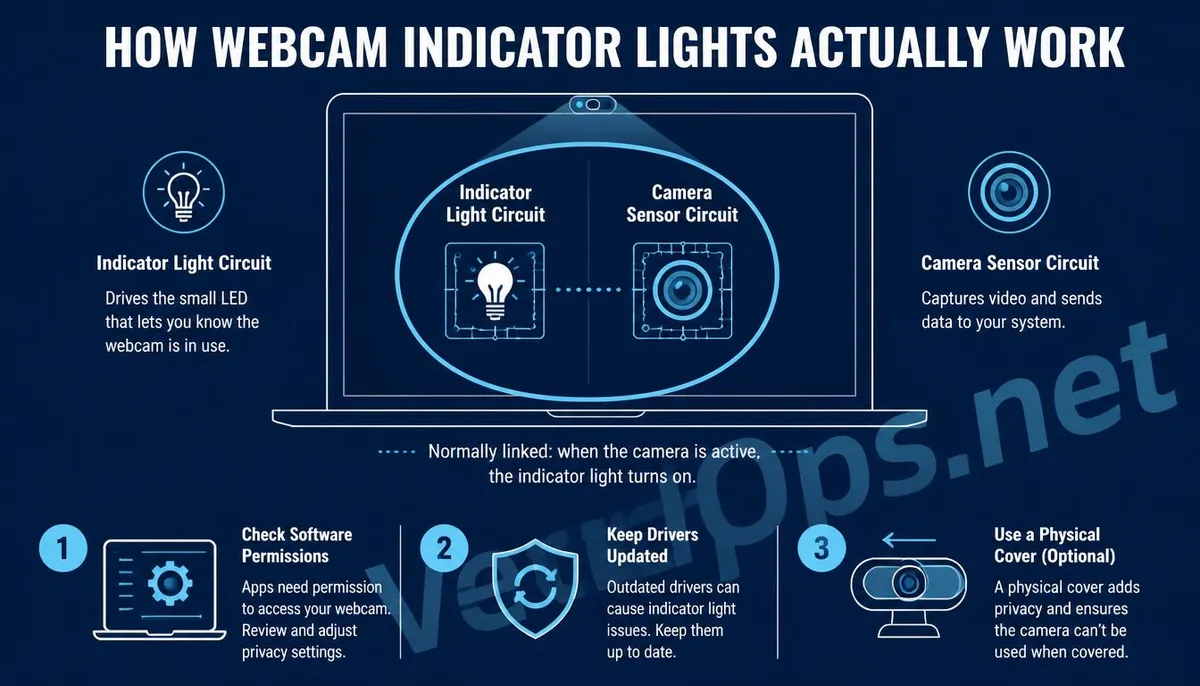
Most laptop manufacturers design the camera so that the indicator light is tied to the power circuit of the camera. As soon as the camera module is powered on and starts capturing images, the indicator light should theoretically light up as well. This is a hardware-level safety design intended to help users intuitively determine whether the camera is active. This design is indeed effective in most cases, especially with newer laptop models where the circuit design for the camera and the indicator light is more closely integrated. Bypassing the indicator light while allowing the camera to function is relatively difficult on a hardware level.
But Why Are There Reports of Cameras Recording While the Light Is Off?
Such cases exist, but they typically do not involve bypassing the hardware circuit of the indicator light itself. Instead, they involve various scenarios.
- Certain older models or those with simpler designs have independent circuits for the camera and the indicator light. If malicious software gains system-level permissions, theoretically, it can activate the camera module without turning on
- More often, the situation isn't about bypassing hardware but rather that the user does not notice the indicator light is on, such as when the recording is brief, occurs during the moment the screen is waking from sleep, or the user is
- Malicious software typically needs to be introduced into the device through some means, such as dubious cracked software, phishing email attachments, or disguise normal program downloaded files. Once it gains execution privileges, it could
Simple Self-Protection Methods You Can Implement
You don't need any technical background; these methods can be adopted immediately.
- Regularly check the list of installed applications on your system and remove anything irrelevant or that hasn't been used in a long time, especially software claiming to offer free access to paid tools or cracked versions, as these sources
- Keep your operating system and antivirus software updated. Most providers continuously patch known vulnerabilities, while outdated versions of systems are more susceptible to invasion by known methods.
- Use a physical camera cover or a small piece of opaque tape placed over the camera. This is recognized as the most direct and effective means of physical protection, requiring no reliance on any software judgments, nor is it dependent on
If you suspect the device has been infected with malware or find any concerns about recorded footage being leaked, this typically warrants further verification of the actual state of the device's infection and subsequent handling directions. VexelOps can help clarify such situations and identify risk areas that require attention.
Common Questions Users Have About Laptop Camera Privacy
Is It Normal for the Indicator Light to Be On During Video Conferencing Software?
Yes, it is normal. Video conferencing software continuously occupies camera resources during a call, so it is expected for the indicator light to remain on. What users should pay attention to is whether the indicator light indeed turns off after the meeting ends. If the call has been terminated but the light remains on for a while, it could be checked in Task Manager or Activity Monitor for any background processes of the software still running.
Are Camera Covers Too Simple? Is There a Better Method?
While physical covers may seem basic, their advantage lies in entirely not relying on software or system judgement. Even if the device has indeed been infected with malware and successfully bypasses the indicator light, the camera is still physically shielded, leaving only a black screen. Designed sliding camera covers are also available for purchase on the market, providing the same efficacy. The key lies in the principle of physical shielding rather than the aesthetic quality of the sticker itself.
Besides the Camera, Does the Microphone Also Face Similar Risks?
Microphones can indeed face similar remote access risks, working on principles similar to the camera that require obtaining execution permissions for the device. Most operating systems have recently introduced indicators while the microphone is in use, such as microphone icons on the menu bar. For higher protection, users can check in system settings which applications have microphone access and disable unnecessary permissions.
One Key Takeaway: The indicator light being off generally means that the camera is not functioning, but it cannot completely rule out the possibility of older devices or malicious software bypassing it. Regularly checking for suspicious software and using physical covers to obscure the camera are the simplest and most reliable ways to protect yourself.