

Nmap Does Much More Than Just Port Scanning
If you've read an introductory guide to Nmap and know that it can scan which ports are open on a target host, that's just the surface of what this tool can do. In actual penetration testing, Nmap usually appears in the early phases of testing, specifically in the information gathering stage. Testers need to understand as clearly as possible the network architecture of the target environment before beginning any offensive testing actions, including which hosts are online, what services these hosts are running, what versions of those services are active, what operating systems are being used, and what the general firewall settings are for that environment. Nmap provides tools to answer most of these questions, and it does so efficiently.
Service Version Detection: Knowing That a Port is Open Isn't Enough
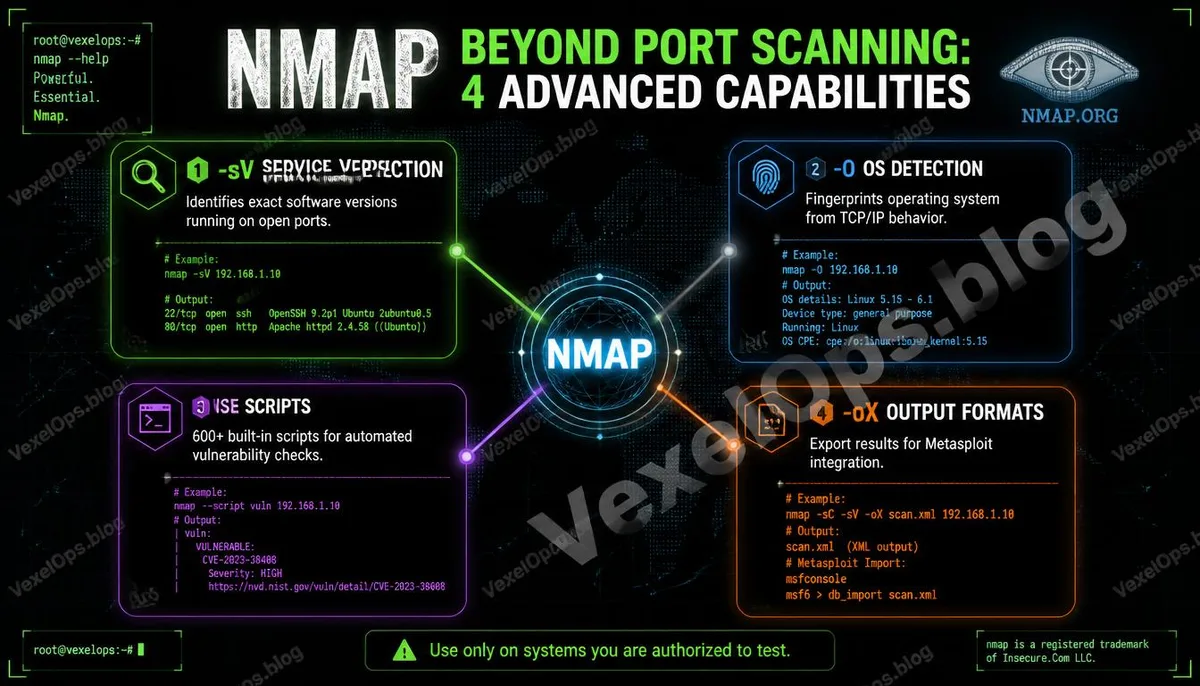
If you scan a host and find that port 80 is open, you only know that it is running some HTTP service. But version detection can tell you whether that service is Apache 2.4.51 or Nginx 1.18.0, and in some cases, it can also identify the version of the framework used in the backend. The importance of this information lies in the fact that vulnerability databases are organized by software version. Knowing the specific version of a target service allows you to directly check if there are any known vulnerabilities for that version and the severity of those vulnerabilities. To enable version detection, add the -sV parameter to your basic scan: nmap -sV targetIP Nmap identifies service versions by sending a series of probe packets to the open ports and comparing the response characteristics with its built-in service signature database, which currently contains identification features for over six thousand services.
OS Detection: Understanding What You're Up Against
Different operating systems exhibit slight but recognizable behavioral differences when handling network packets, such as the method for generating TCP initial sequence numbers, default TTL values, and TCP window size settings. Nmap's OS detection feature deduces the type and version of the operating system being used by the target host by analyzing these differences. To enable OS detection, add the -O parameter, but this feature must be run as an administrator or root user: nmap -O targetIP The results typically include several possible OS candidates along with their respective match confidence levels. A higher confidence level indicates that Nmap is more certain about its determination. In real tests, OS information is critical for subsequent vulnerability assessments, as many vulnerabilities target specific OS versions. Understanding the composition of the target environment's operating systems can make subsequent testing more focused.
NSE Scripting Engine: Automating More Complex Tasks with Nmap
The Nmap Scripting Engine (NSE) is the most extensible part of Nmap. NSE allows users to write scripts in Lua, enabling Nmap to automatically perform various tasks during the scanning process, from further confirming service versions and automatically detecting known vulnerabilities to executing brute-force tests—all achievable through NSE scripts. Nmap comes pre-installed with over six hundred official scripts, organized by functionality categories. Some common categories include: - auth: Tests authentication settings of services, such as checking for default passwords - vuln: Automated detection of known vulnerabilities - discovery: More in-depth collection of service and network information - safe: Scripts marked as having no destructive impact on the target The syntax for executing a specific script is as follows: nmap --script scriptName targetIP For example, to execute all scripts related to HTTP: nmap --script http-* targetIP
Common Scan Commands for Combined Usage
In actual testing work, these parameters are often combined to obtain more complete information from a single scan. Comprehensive Reconnaissance Scan: nmap -sV -O -sC targetIP -sC parameter executes the default script set, completing version detection, OS identification, and default script analysis all in one scan. Quick Scan Targeting Specific Port Range: nmap -p 1-1000 -sV targetIP Scan Entire Subnet and Output Results to File: nmap -sV 192.168.1.0/24 -oN scanresults.txt The -oN parameter makes Nmap save scan results as a text file for easier analysis and reporting later. These commands should only be used in environments where you have explicit authorization, in your own testing networks, within authorized penetration testing scopes, or in practice environments for CTF competitions.
Common Questions About Nmap's Advanced Features from Cybersecurity Learners
Is there a way to speed up Nmap scans?
Nmap provides timing templates, using -T followed by a number from 0 to 5 to control the aggressiveness of the scan. The higher the number, the faster the speed, but it also increases the risk of being detected by firewalls or intrusion detection systems. -T4 is a commonly used option for good network conditions, while -T5 is the fastest but easiest to detect. In scenarios where discretion is essential, -T2 or -T1 extends the time interval between scans, reducing the chance of triggering alarms. In addition, narrowing the range of scanned ports by using -p to specify only necessary ports instead of scanning all 65,535 ports can significantly shorten scanning time.
What is the security of NSE scripts? Do scripts in the vuln category impact the target?
This is a very important judgment point in actual usage. Nmap scripts are marked based on their potential impact on the target; safe scripts are marked as not having negative effects, intrusive scripts may cause noticeable impacts like excessive requests or trigger certain security mechanisms, while exploit scripts may actually exploit vulnerabilities. When testing authorized targets, it is advised to understand the markings and functionalities of the planned scripts to avoid executing potentially disruptive scripts without adequate knowledge. Special caution should be taken when testing in production environments or on business-critical systems regarding the potential impacts of each script.
How are Nmap scan results integrated into penetration testing reports?
Nmap offers several output formats to facilitate reporting integration. -oN outputs in normal text format, -oX outputs in XML format, which can be parsed by other tools, -oG outputs in grepable format for quick filtering with command-line tools, and -oA exports all formats at once. XML output can be directly imported into tools like Metasploit, allowing scan results to be seamlessly integrated into subsequent testing workflows. In report writing, converting Nmap scan results into clear service listings and version information tables is a standard component of penetration testing reports, allowing clients to clearly understand the exposure of their network from an external perspective.
One Key Takeaway: The value of Nmap lies not only in the ports it scans but in its ability to transform the network status of the target environment into structured information that can be systematically analyzed. The combination of version detection, operating system identification, and the NSE script engine makes it the most comprehensive single tool in the information gathering phase of authorized testing environments.